

Welcome to the comprehensive technical and user manual for Dreams CRM v1.0.0 — the premier WordPress-native Customer Relationship Management solution.
Traditional WordPress CRM plugins store records as Custom Post Types (CPTs)
inside wp_posts and wp_postmeta. As contact databases
grow past 10,000 records, standard WP queries experience severe degradation,
causing slow dashboard page loads and database timeouts. Dreams CRM solves this
architectural bottleneck by operating on an isolated, dedicated database schema
comprising 52 custom SQL tables with full indexing.
Key Architectural Pillars
Decoupled React 19 SPA
Runs inside WordPress Admin as a client-side Single Page Application built with React 19, Redux Toolkit, and RTK Query. UI state transitions execute in sub-50ms with zero full-page browser reloads.
52 Non-CPT Custom SQL Tables
Stores all contacts, leads, deals,
tasks, activities, and custom fields in 52 dedicated
wp_dcrm_* SQL database tables created via
dbDelta. Guarantees maximum query efficiency.
Granular RBAC Engine
Stores custom capability matrices in
wp_dcrm_roles_meta. Enforces 52 permission flags across
view, edit, delete, and export actions for every WordPress role.
Action Scheduler Async Engine
Executes heavy background tasks (email campaigns, Contact Form 7 ingestion logs, WooCommerce order sync) asynchronously without slowing down visitor storefront response times.
Please review the minimum and recommended server configuration settings required to run Dreams CRM smoothly:
| Component / Directive | Minimum Requirement | Recommended Setting | Technical Rationale |
|---|---|---|---|
| PHP Version | PHP 7.4 | PHP 7.4 | Utilizes typed properties, match expressions, and nullsafe operators. |
| WordPress Core | WordPress 6.0+ | WordPress 6.5 - 6.7 | Requires WP REST API v2 infrastructure and Gutenberg block compatibility. |
| MySQL Database Engine | MySQL 5.7 / MariaDB 10.3 | MySQL 8.0+ / MariaDB 10.6+ | Requires InnoDB storage engine with full foreign key constraint support. |
| PHP Memory Limit | 128M | 256M or 512M | Supports batch CSV data imports and concurrent Action Scheduler queues. |
max_input_vars |
1000 | 3000 or higher | Prevents field truncation when saving large RBAC matrix permission forms. |
max_execution_time |
30 seconds | 300 seconds | Allows database table creation during initial plugin activation
via dbDelta. |
| WooCommerce (Optional) | WooCommerce 8.0+ | WooCommerce 8.9+ | For WooCommerce Sales Analytics, Cart Drawer, and Checkout Field Builder. |
Dreams CRM adheres strictly to PSR-4 autoloading standards under
the root PHP namespace Dreams\CRM\. The file organization is
structured as follows:
wp-content/plugins/dreams-crm/
├── admin-app/                  # React 19 TypeScript Single Page App source
│   ├── build/                  # Production compiled JS/CSS asset bundle
│   └── src/
│       ├── components/         # UI Component Views (Dashboard, Contacts, Kanban, Graph)
│       ├── hooks/              # Custom React hooks & state helpers
│       ├── store/              # Redux Toolkit Slices & RTK Query REST endpoints
│       ├── utils/              # Client-side utility functions & formatters
│       ├── types.ts            # TypeScript interfaces & entity definitions
│       └── index.tsx           # React SPA Root Entrypoint
├── assets/                     # Enqueued frontend & admin styles/scripts
│   ├── css/                    # Global admin CSS & layout styles
│   └── js/                     # Beacon tracker & frontend scripts
├── includes/                   # PHP Backend Core (PSR-4 Namespace: Dreams\CRM\)
│   ├── admin/                  # Admin setup wizard & UI controllers
│   ├── cli/                    # WP-CLI commands (wp dreams-crm seed)
│   ├── core/                   # Activator, Deactivator, EventBus, Permissions
│   ├── entities/               # Contacts, Companies, Leads, Deals, Tasks, Notes
│   ├── integrations/           # CF7 form ingestion & WooCommerce core bridge
│   ├── modules/                # Deduplication merge engine & business modules
│   ├── rest/                   # WP REST API Routes & 20+ REST Controllers
│   ├── services/               # Seeder, Scoring, Dedup, Email Queue, Import/Export
│   ├── settings/               # System configuration & setting registries
│   └── woo-suite/              # Checkout Field Builder, Quick Cart & Product Compare
├── languages/                  # Translation POT/PO/MO files (i18n)
├── tests/                      # Automated unit & integration test suites
├── composer.json               # Composer dependencies & PSR-4 autoload rules
├── package.json                # React 19 & TypeScript npm dependencies
├── phpcs.xml                   # WordPress Coding Standards (WPCS) ruleset
├── uninstall.php               # Plugin cleanup & table drop handlers
└── dreams-crm.php # Main Plugin Bootstrap FileExecutive Analytics
- Real-time KPI metric widgets
- Revenue pipeline funnel charts
- WooCommerce LTV & AOV tracking
Kanban Pipelines
- Drag & drop stage transitions
- Configurable deal probabilities
- Bulk stage transitions & deal values
Granular RBAC
- 52 capability permission flags
- Custom role registry table
- Client-side & server-side enforcement
Node Canvas Graph
- SVG draggable relationship graph
- Bidirectional entity link nodes
- Side detail drawer for entity nodes
CF7 Form Ingestion
- Form mail-tag field mapping
- Deduplication rules (skip/update)
- Background retry via Action Scheduler
Woo Commerce Suite
- AJAX quick cart drawer
- Checkout field builder
- Product compare side drawer
Dreams CRM is engineered to automate and streamline every phase of the customer journey, from initial prospect capture to long-term account retention. Below is the standard operational lifecycle executed across the 20+ interconnected modules:
Capture
Leads captured via Contact Form 7,
WooCommerce checkout, or CSV batch migration into
wp_dcrm_contacts.
Enrich & Dedup
Predictive scoring algorithm evaluates email domain & budget. Fuzzy deduplication prevents duplicate contact pollution.
Kanban Deal
Qualified leads convert to deals in multi-pipeline Kanban boards. Sales reps advance deals with drag-and-drop ease.
Invoice & LTV
Deals marked Won trigger branded PDF invoice generation, payment tracking, and automated WooCommerce LTV sync.
wp_dcrm_* database schema,
updates to contacts immediately reflect across deals, invoices, audit
activities, and the node relationship canvas without cache delay.
- Log into your WordPress Admin Dashboard
(
/wp-admin). - Navigate to Plugins → Add New → Upload Plugin.
- Select the
dreams-crm.zipinstallation archive and click Install Now. - Click Activate Plugin. The 52 custom SQL
database tables will automatically seed via
dbDelta. - Access the main CRM interface from the new Dreams CRM left sidebar menu item.
- Unzip
dreams-crm.zipon your local computer. - Open your FTP client (FileZilla, Cyberduck) and connect to your web server.
- Upload the unzipped
dreams-crm/folder into/wp-content/plugins/. - Log into WP Admin, navigate to Plugins → Installed Plugins, and click Activate next to Dreams CRM.
Dreams CRM includes a built-in relational demo data seeder engine that automatically populates all CRM modules (Contacts, Companies, Leads, Deals, Invoices, Projects, Tasks, Sales Funnels, A/B Tests, Campaigns, and Activity Streams) with realistic, fully mapped sample records for immediate evaluation.
- In WP Admin, navigate to Dreams CRM and click the Settings button in the top navigation bar.
- Select the Data Retention tab from the settings menu bar.
- Under Seed Developer Demo Data, select your preferred record count per module (10, 20, 50, or 100 records) and click the Seed Demo Records / Module button. Seeding imports connected records across all modules with full relational mapping.
- Alternatively, trigger seeding via WP-CLI:
wp dreams-crm seed(or specify count:wp dreams-crm seed --count=20,wp dreams-crm seed --count=50,wp dreams-crm seed --count=100).
Section 3: Core CRM Plugin Modules
Detailed technical manual, entity data flows, database schemas, and administrative workflows for core CRM business modules.
The Executive Dashboard serves as the central command center for Dreams CRM,
fetching real-time aggregated metrics asynchronously via
GET /wp-json/dreams-crm/v1/dashboard/kpis with sub-50ms render
speed.
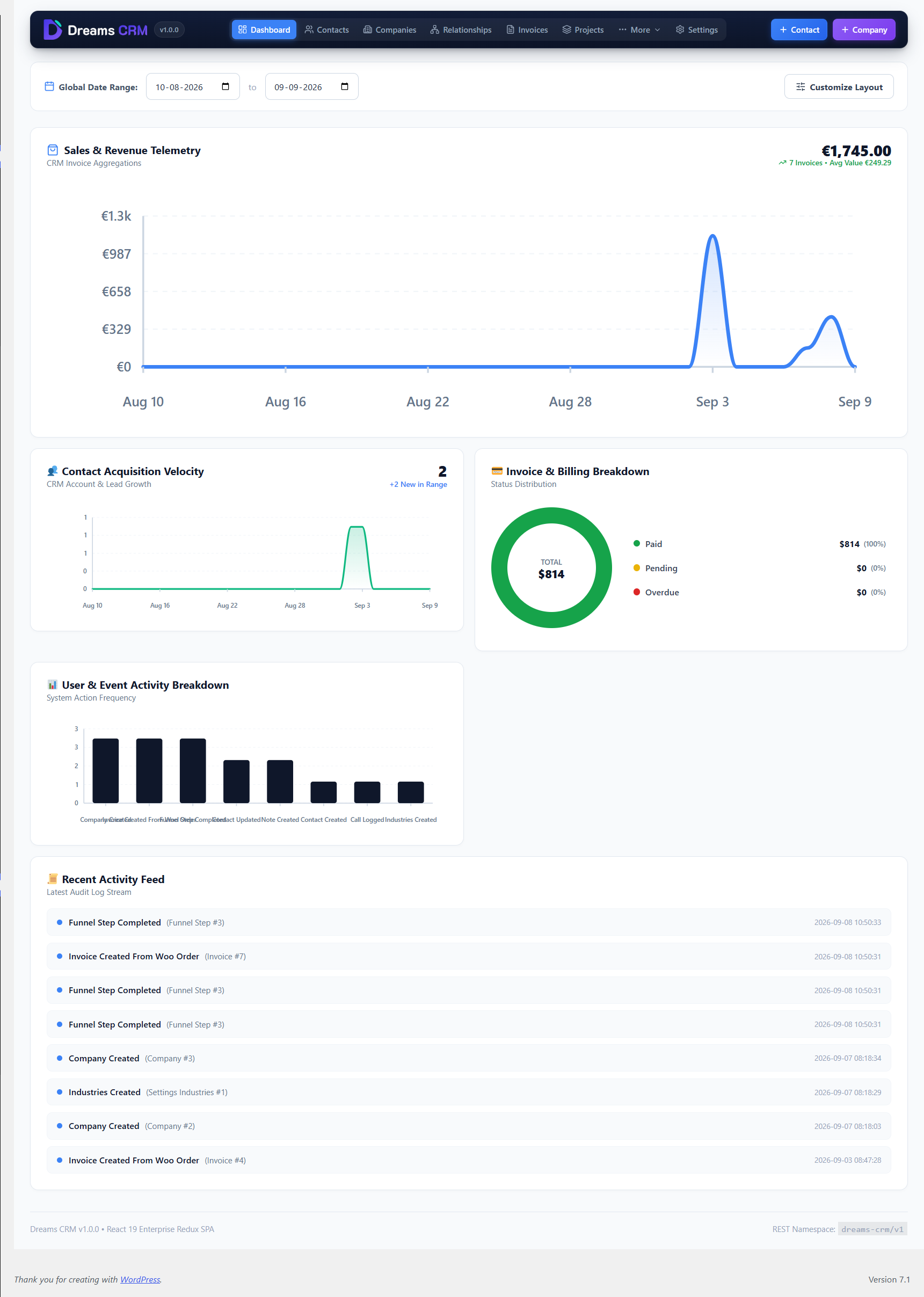
Figure 3.1: Dreams CRM Executive Dashboard Panel embedded inside WP Admin.
Widget Specifications & Analytics Data Models
Total Contacts & Accounts Widget
Calculates active customer profiles
stored in wp_dcrm_contacts and
wp_dcrm_companies. Displays Week-over-Week (WoW) and
Month-over-Month (MoM) growth rates using sliding 30-day window
intervals.
- Formula:
((Current_Month - Previous_Month) / Previous_Month) * 100 - Filterable by date ranges: 7 Days, 30 Days, This Quarter, YTD
Revenue Pipeline Funnel Widget
Visualizes deal pipeline progression across defined stages (Prospecting, Discovery, Proposal Sent, Negotiation, Closed Won).
- Calculates total pipeline valuation (Sum of
wp_dcrm_deals.amount) - Weighted revenue forecast formula:
Sum(Amount × Win_Probability_%)
Live Audit Activity Stream
Logs system events from
wp_dcrm_activities in real-time. Tracks contact
creation, deal stage movements, assigned tasks, and user notes with
user avatar attribution.
WooCommerce Commerce Summary
Direct integration with storefront order tables. Synchronizes orders to display total gross revenue, Customer Lifetime Value (LTV), and Average Order Value (AOV).
User Operational Guide: Navigating the Executive Dashboard
- Adjust Date Ranges: Click the date range selector at the top-right of the dashboard to filter aggregated statistics across Last 7 Days, Last 30 Days, This Month, This Quarter, or Year-to-Date (YTD).
- Interpret KPI Badges: Green positive percentages indicate growth compared against the prior equivalent period, while red negative badges indicate a decline, allowing sales leadership to detect performance trends early.
- Inspect Real-Time Activity: The live activity audit feed updates dynamically as team members create contacts, move deals, or log calls. Click any activity item to open the corresponding record drawer.
- Export Snapshot Reports: Click Export Summary Report to generate a branded CSV or printable summary of current CRM KPIs for executive stakeholder presentations.
The Contacts Directory serves as the single source of truth for individual
customer profiles, prospects, and stakeholders. Stored in the dedicated SQL
table wp_dcrm_contacts, it provides sub-second debounced searching,
lifecycle stage tracking, custom field values, and comprehensive bulk batch
management.
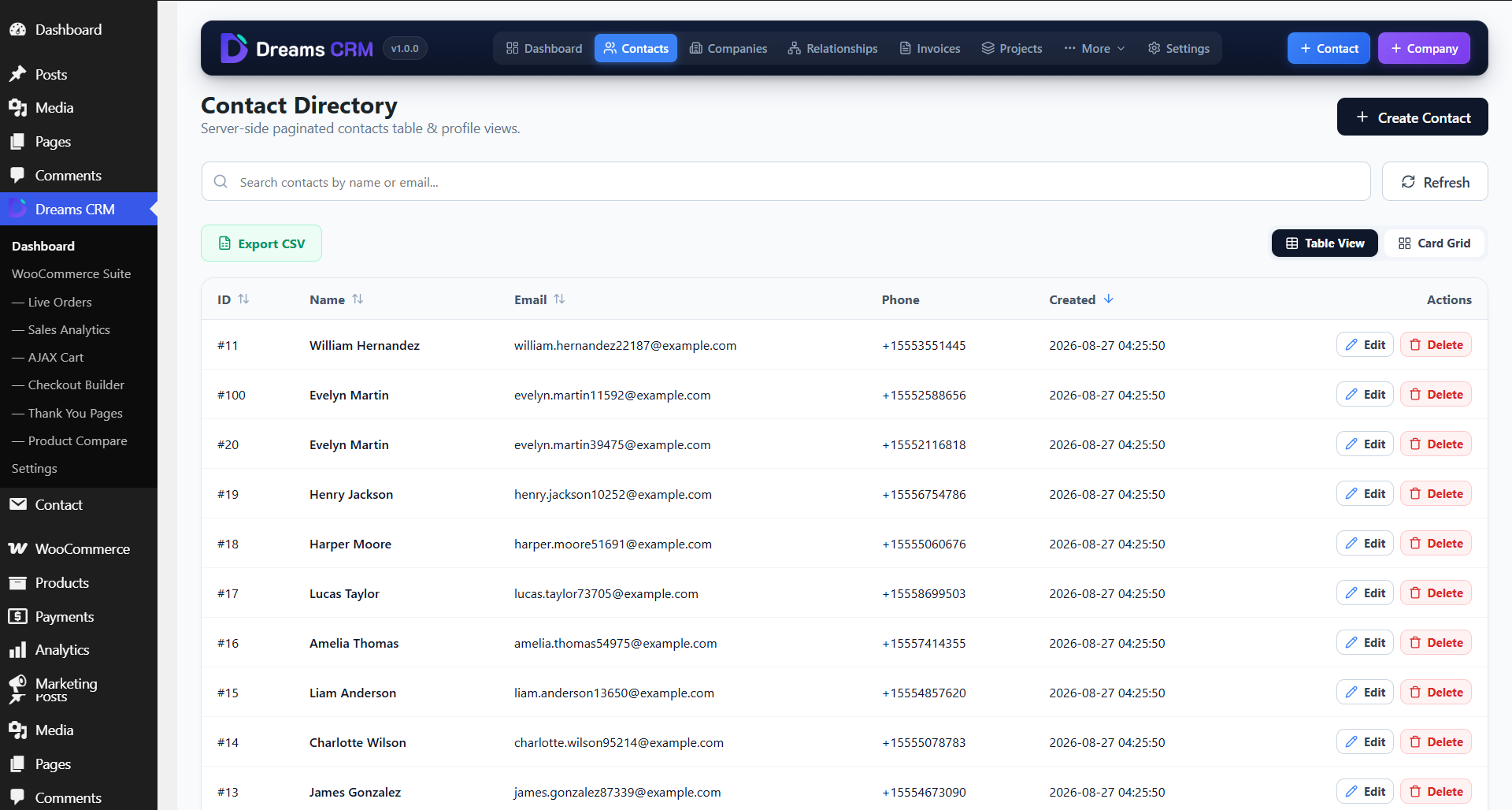
Figure 3.2: Dreams CRM Contacts Directory Interface.
Step-by-Step User Guide: How to Manage Contacts
- Adding a New Contact: Click the + Add Contact button in the top header. In the modal, fill in First Name, Last Name, Email, Phone, Company, Lifecycle Stage (Lead, MQL, SQL, Customer, Churned), and assign an internal sales owner. Fill in any custom fields defined for contacts and click Save Contact.
- Live Search & Filtering: Use the instant search bar to find contacts by name, email, or telephone. Use the dropdown filters to isolate contacts by Lifecycle Stage, Assigned Sales Rep, or Creation Date Range.
- Using the 5-Tab Detail Inspector Drawer:
Click on any contact name in the table to open the slide-out inspector
drawer without leaving the page:
- Overview Tab: View contact details, computed predictive lead score badge, and quick action buttons (Call, Email, Add Deal).
- Activities Timeline: Full chronological audit log of all emails sent, meetings scheduled, deals created, and stage movements.
- Associated Deals: Summary of open and closed deals tied to this contact with stage status and dollar value.
- Notes & Calls: Write internal notes with rich text or log summaries of phone conversations with call outcome tags.
- Custom Fields: View and update business-specific custom field attributes on the fly.
- Logging Calls & Notes: In the contact drawer's Notes & Calls tab, click + Log Call to record call duration, date, and call outcome (e.g. Interested, Left Voicemail, Wrong Number), which instantly appends to the customer's timeline.
- Executing Bulk Batch Actions: Select multiple contacts using the left-hand checkboxes. Use the bulk action bar to: Reassign Sales Owner, Update Lifecycle Stage, Export Selected to CSV, or Move to Trash.
Database Schema Specification:
wp_dcrm_contacts
| Column Name | Data Type | Index Key | Description |
|---|---|---|---|
id |
BIGINT(20) UNSIGNED | PRIMARY KEY | Unique auto-increment contact identifier. |
first_name |
VARCHAR(100) | - | Contact given name. |
last_name |
VARCHAR(100) | - | Contact family name. |
email |
VARCHAR(255) | INDEX (MUL) | Primary email address (Indexed for instant lookup). |
phone |
VARCHAR(50) | - | Direct phone / mobile number. |
company_id |
BIGINT(20) UNSIGNED | FOREIGN KEY | FK → wp_dcrm_companies.id. Associated organization.
|
lifecycle_stage |
VARCHAR(50) | INDEX (MUL) | Stage: subscriber, lead,
customer, churned.
|
score |
INT(11) | - | Calculated predictive lead score integer. |
owner_id |
BIGINT(20) UNSIGNED | FOREIGN KEY | FK → wp_users.ID. Assigned WP user/sales rep. |
created_at |
DATETIME | - | Timestamp of record creation. |
Stores corporate organization accounts in wp_dcrm_companies.
Supports B2B account-based management, corporate domain tracking, employee size
banding, annual revenue estimation, and parent/subsidiary account linking.
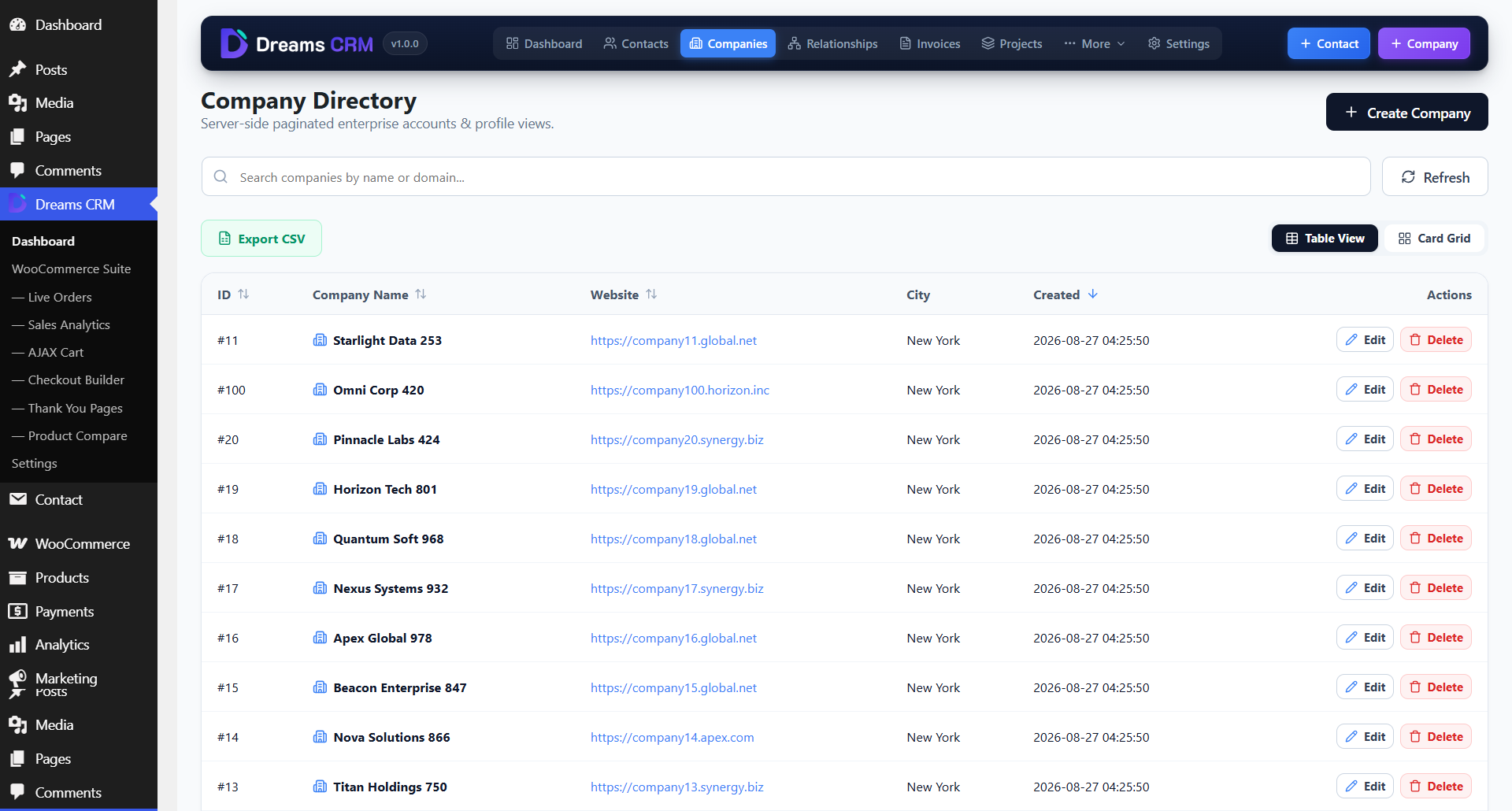
Figure 3.3: Companies Directory & Organization Profiles.
Step-by-Step User Guide: How to Manage B2B Accounts
- Creating a Company Profile: Click
+ Add Company. Enter Company Name, Corporate Website
Domain (e.g.
acme.corp), Industry dropdown selection, Employee Size Band, Annual Estimated Revenue, Phone, and Billing Address. - Automatic Contact Grouping: Once a company is created, any contact added with an email matching the company domain or explicitly mapped to the company will automatically appear in the company's Employees & Stakeholders roster.
- Parent / Subsidiary Linking: For corporate
enterprise clients with regional subsidiaries, set the
Parent Companydropdown to establish a hierarchical organizational tree visible in the Relationship Graph. - Account Pipeline Valuation: Open the company drawer to immediately see the combined revenue value of all past and active deals linked to any contact under this organization.
Firmographic Account Attributes
Corporate Domain & Web Enrichment
Automatically extracts root website
domains (e.g. acme.com) to display favicon brand logos
and group employee contact records.
Parent / Child Account Hierarchy
Establishes corporate hierarchies linking subsidiary regional offices to global parent corporate headquarters.
The Sales Pipeline module provides dual interfaces: an Inbound Leads Directory table and a multi-pipeline Drag & Drop Deals Kanban Board. It enables sales teams to manage opportunities from initial prospect acquisition through stage qualification to deal closure.
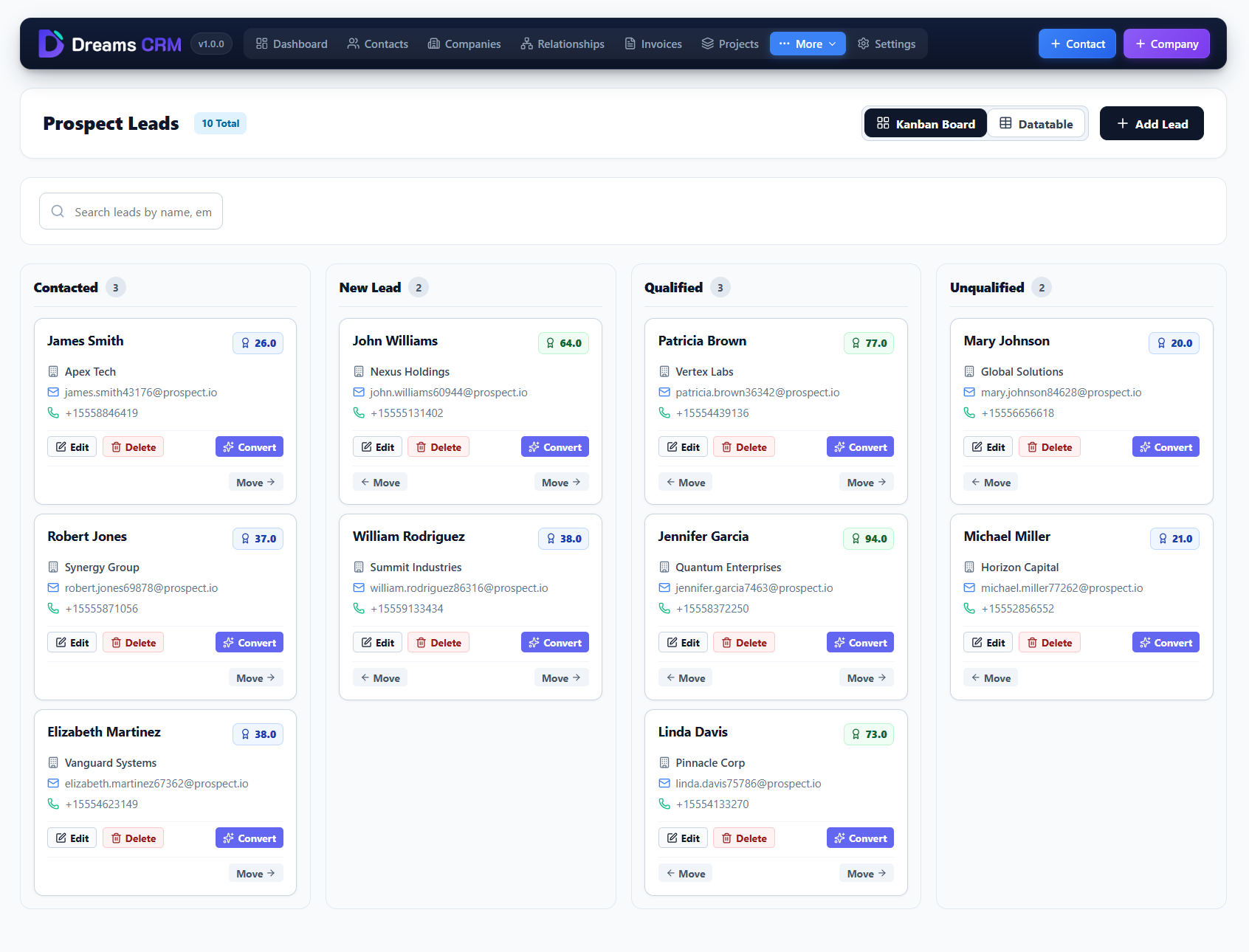
Figure 3.4a: Inbound Leads Pipeline & Qualification Manager.
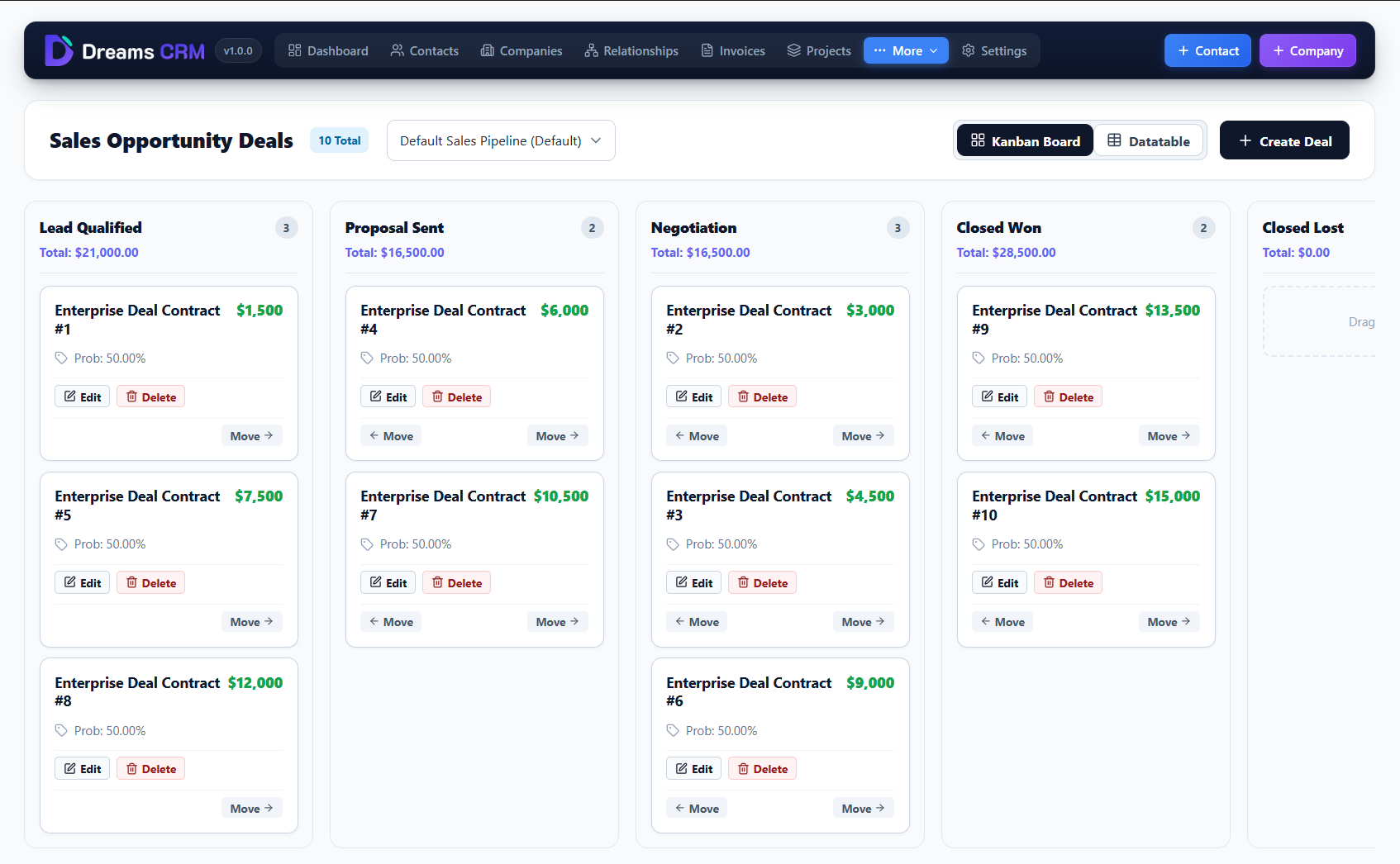
Figure 3.4b: Deals Drag & Drop Kanban Board.
Step-by-Step User Guide: Managing Pipelines & Deals
- Qualifying & Converting Inbound Leads: In the Leads tab, review new prospects captured via website forms. Once a lead is verified, click Convert to Deal to create an active pipeline deal while converting the lead to a Contact.
- Switching Pipelines: Use the top pipeline selector dropdown to toggle between different business pipelines (e.g. Direct Sales, Enterprise B2B, Upsells & Renewals).
- Adding a New Deal: Click + Add
Deal. Enter the Deal Title, select the primary Contact and
Company, specify Deal Valuation Amount (e.g.
$25,000), Target Expected Close Date, and select the initial stage. - Dragging Cards Across Stages: Drag any deal card horizontally to transition it (e.g. from Discovery to Proposal Sent). Each stage card recalculates the total column dollar volume and weighted forecast amount automatically.
- Closing Deals (Won / Lost):
- Closed Won: Drag to the Won stage or click Mark Won to trigger success celebrations, record the win date, and optionally generate an Invoice.
- Closed Lost: Drag to Lost to open the Lost Reason modal. Select why the deal was lost (e.g. Price, Competitor, Budget Cut, Lost Interest) to power win/loss ratio reports.
- Switching Views (Kanban vs DataTable): Click the view toggle buttons in the top right to switch between the visual Kanban Board and a sortable DataTable view with bulk edit capabilities.
Kanban Stage Mechanics & Optimistic UI Updates
Dragging a deal card across stage columns triggers an immediate optimistic UI update. If the API request succeeds, a success notification fires; if it fails, RTK Query automatically rolls back the deal card position.
// Optimistic RTK Query stage transition handler snippet
const [moveDeal] = useMoveDealMutation();
const handleDragEnd = async (dealId, targetStageId) => {
  try {
    await moveDeal({ id: dealId, stage_id: targetStageId }).unwrap();
    toast.success('Deal stage updated successfully');
  } catch (err) {
    toast.error('Stage transition failed. Rolling back...');
  }
};Dreams CRM features a full-featured, enterprise-grade invoicing and payment
collection engine. Stored in wp_dcrm_invoices and
wp_dcrm_inv_items, it provides multi-currency billing, custom tax
rate calculation, line item pricing calculators, printable PDF export, and
direct linking across Contacts, Companies, and Deals.
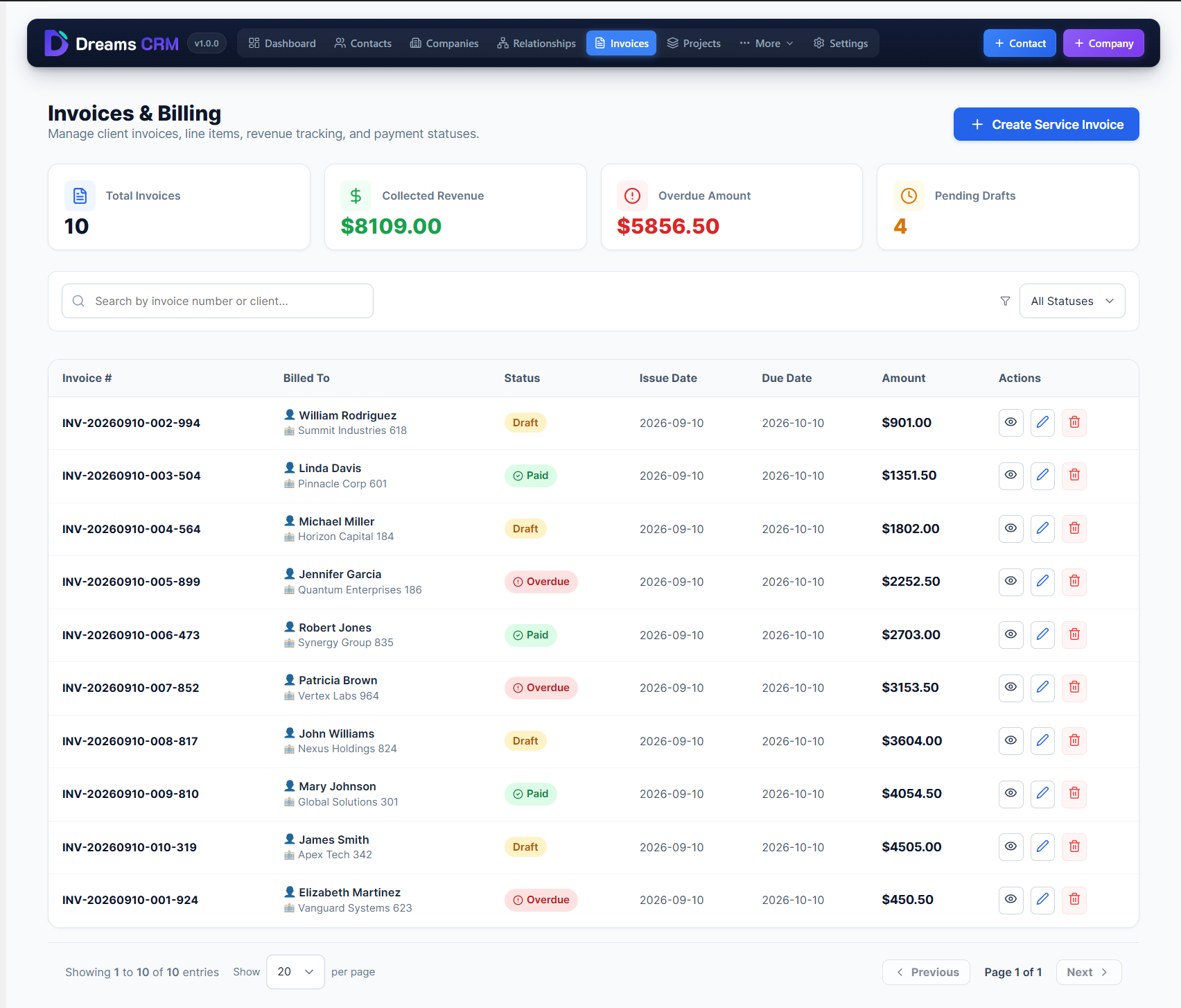
Figure 3.5: Dreams CRM Invoicing & Financial Billing Engine.
Step-by-Step User Guide: Creating & Dispatching Invoices
- Creating a New Invoice: Click +
Create Invoice. Select the recipient Contact or Company
account, choose the linked Deal (optional), specify Invoice Number (e.g.
INV-2026-0042), Issue Date, Due Date, and Billing Currency (USD, EUR, GBP, AUD, etc.). - Building Itemized Line Items: Click + Add Item to add service or product rows. Enter Description, Quantity, Unit Rate, and select individual Tax Rates. The dynamic calculator computes item totals, subtotal, total tax, and net grand total in real time.
- Applying Discounts & Notes: Enter fixed or percentage invoice discounts, specify Payment Terms (e.g. Net 30 Days), and add personalized client thank-you notes or bank wire instructions.
- Exporting & Printing Branded PDFs: Click Print / PDF to generate a clean, branded PDF invoice document incorporating company logos, addresses, and tax identifiers ready for sending or physical printing.
- Recording Payments & Tracking Lifecycle: When payment is received, click Record Payment to update the status from Sent to Paid. Overdue invoices automatically highlight in red on the dashboard once the due date elapses.
Core Financial Capabilities & Accounting Architecture
Multi-Line Item Builder
Dynamic line item builder supporting product descriptions, unit costs, quantities, and line item tax allocations.
Automated Tax & Discount Engines
Calculates subtotal, percentage/fixed tax deductions, and net balance due in real time with localized currency formatting.
Payment Lifecycle Tracking
Automates invoice lifecycle statuses
(Draft, Sent, Paid,
Overdue) with due-date reminders and status badges.
Invoice Database Entity Structure
| Field | Type | Description |
|---|---|---|
invoice_number |
varchar(64) | Unique sequential invoice identifier (e.g.
INV-2026-001).
|
contact_id / company_id |
bigint(20) unsigned | Foreign keys linking billing recipient records. |
subtotal / tax_rate / total_amount |
decimal(12,2) | Monetary aggregates with precise currency rounding. |
status |
varchar(32) | Payment tracking status: draft, sent,
paid, overdue.
|
The Custom Fields Engine enables administrators to extend Contacts, Companies,
Leads, and Deals without modifying PHP code. Definitions are stored in
wp_dcrm_custom_fields and values use an EAV model in
wp_dcrm_custom_field_values.
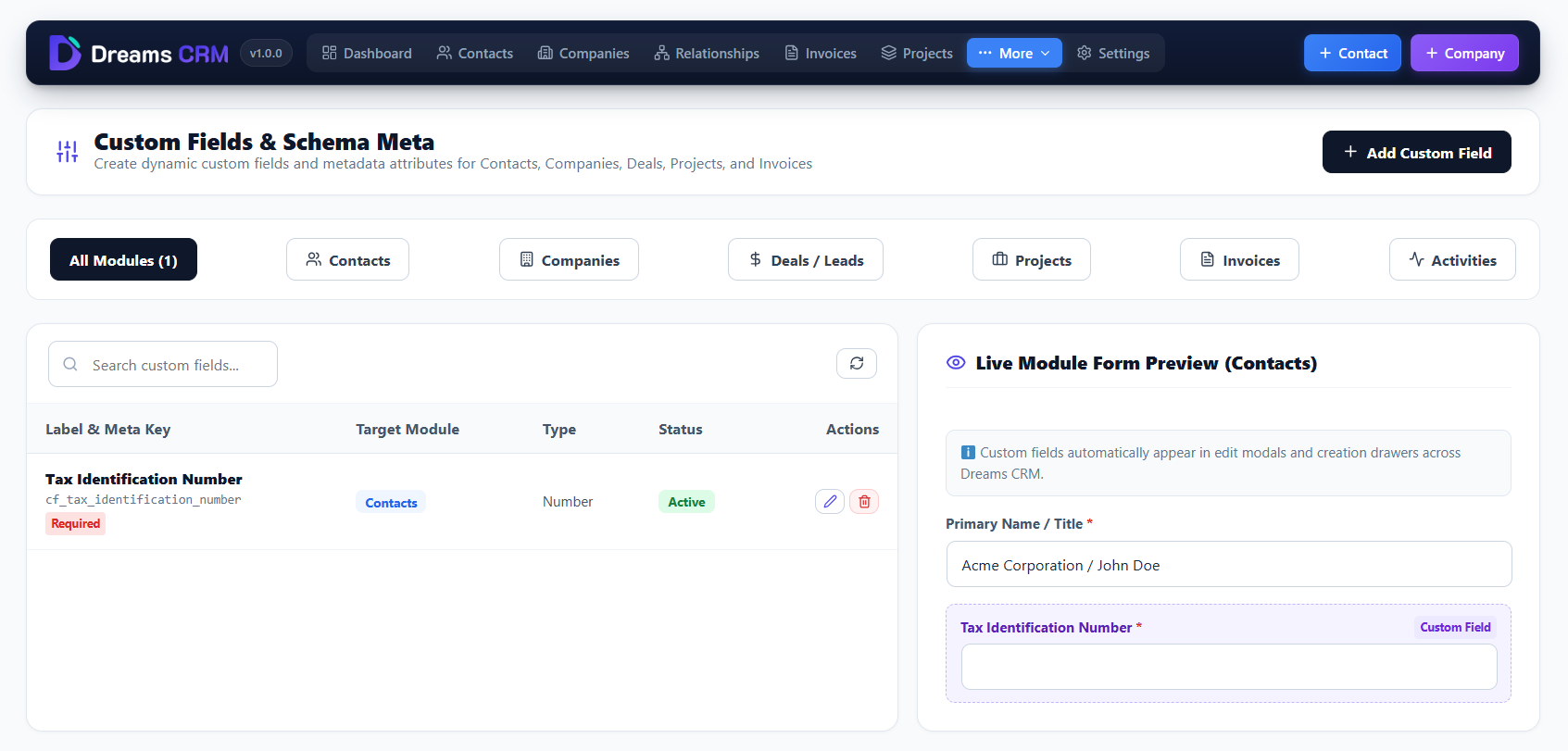
Figure 3.6: Dreams CRM Dynamic Custom Fields Configuration.
Step-by-Step User Guide: Creating & Deploying Custom Fields
- Creating a New Custom Field: Navigate to Dreams CRM → Settings → Custom Fields and click + Add Field.
- Configuring Field Definition: Enter the
Field Label (e.g. Tax ID / VAT Registration), a unique
machine key (e.g.
vat_number), and select the target Entity Binding (Contacts, Companies, Deals, Leads, or Tasks). - Selecting Input Type: Choose from the 6 supported types: Text, Number/Currency, Dropdown Select, Date Picker, Boolean Switch, or Multi-Select. For select menus, enter the option choices separated by commas.
- Setting Validation Rules: Toggle Required Field if data input is mandatory before record submission, and specify an optional default value or input placeholder text.
- Automatic Form & Drawer Injection: Once saved, the new field automatically injects into the entity creation modal, edit dialog, and the Slide-Out Detail Drawer's Custom Fields tab with zero code modification.
Supported Custom Field Input Types
Text & Textarea
Single-line string values and multi-line formatted text blocks.
Number & Currency
Integer, decimal values, and formatted monetary currency inputs.
Select & Radio
Single-choice dropdown select menus and radio button lists.
Date Picker
ISO formatted date values
(YYYY-MM-DD) with calendar popups.
Boolean Switch
True/False toggle switches for flags and compliance opt-ins.
Multi-Select
Multiple checkbox selections stored as JSON array strings.
Dreams CRM includes an enterprise-grade Role-Based Access Control (RBAC) engine.
Capabilities are stored in wp_dcrm_roles_meta and enforced both in
PHP REST controllers and client-side React routes.
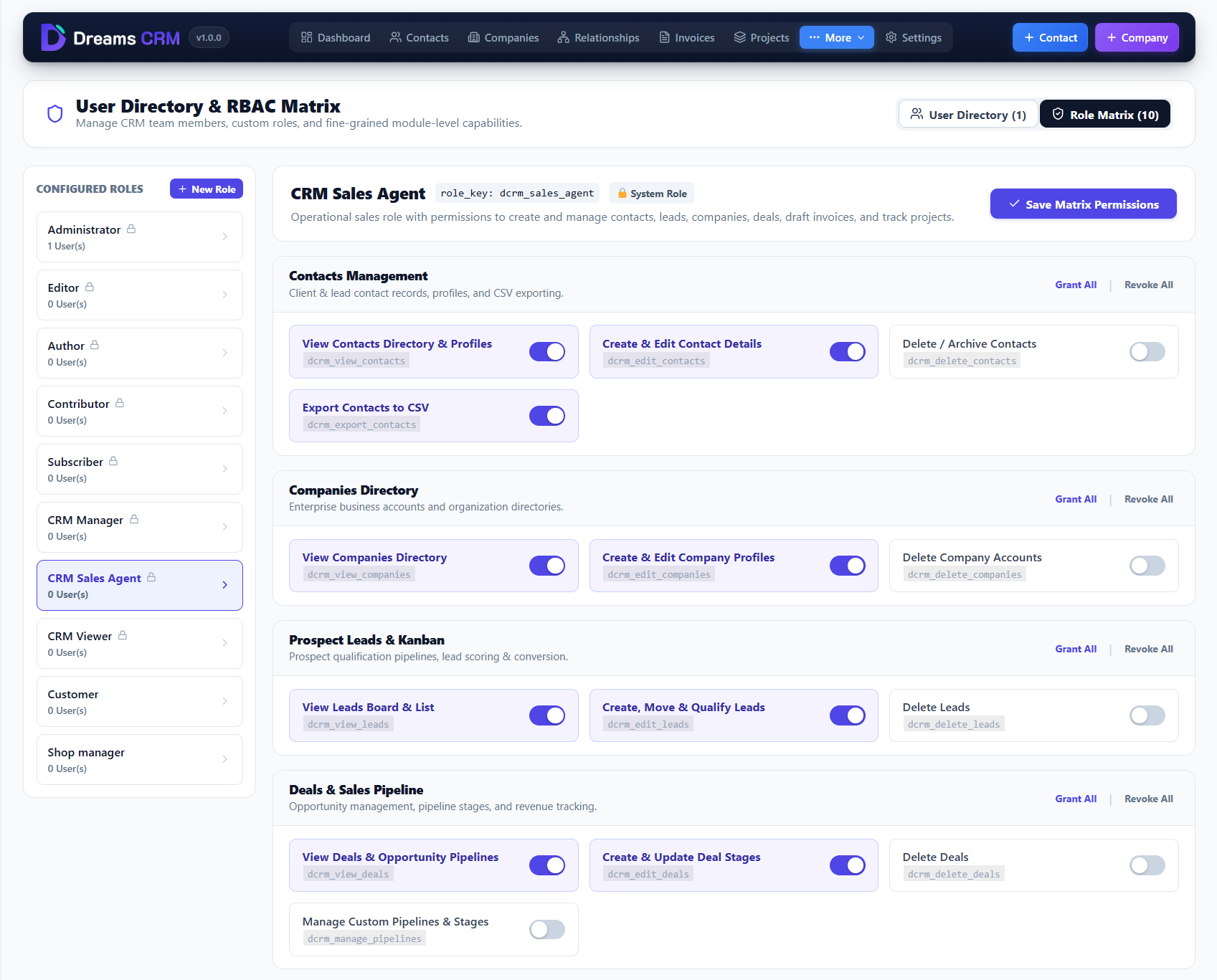
Figure 3.7: User Roles & Granular RBAC Matrix Manager.
Step-by-Step User Guide: Configuring Roles & Permissions
- Selecting or Creating a Role: Under Settings → User Roles, select a standard WordPress role (e.g. Administrator, Editor, Author) or click + Add Custom CRM Role (e.g. Sales Representative, Junior SDR, Finance Manager).
- Configuring Permission Checkboxes: The matrix organizes permissions into intuitive entity rows (Contacts, Deals, Companies, Invoices, Reports, Settings). Check or uncheck permissions across the 5 access columns: View, Create, Edit, Delete, and Export.
- Restricting Financial & Admin Tools:
For junior sales reps, uncheck
delete_contacts,export_reports, andpurge_databaseto prevent unauthorized data extraction. - Saving & Real-Time Enforcement: Click
Save Permissions. The matrix updates
wp_dcrm_roles_metaimmediately. Any affected logged-in user will instantly see restricted navigation items hidden, and unauthorized REST API queries will return403 Forbidden.
52 Granular Capability Permission Flags
| Module Category | Capability Flag Name | Access Description |
|---|---|---|
| Contacts | view_contacts, create_contacts,
edit_contacts, delete_contacts
|
Grants read, write, update, and delete access to contact profiles. |
| Deals | view_deals, create_deals,
edit_deals, move_deals,
delete_deals
|
Controls stage movements and monetary valuation edits on deal cards. |
| Analytics | view_analytics, export_reports |
Allows viewing executive metrics and exporting financial reports. |
| Settings | manage_settings, purge_database,
manage_rbac
|
Administrative permissions for security policies and database tools. |
The Relationship Graph visualizes complex interconnections between Contacts,
Companies, and Deals on an interactive SVG canvas stored in
wp_dcrm_relationships.
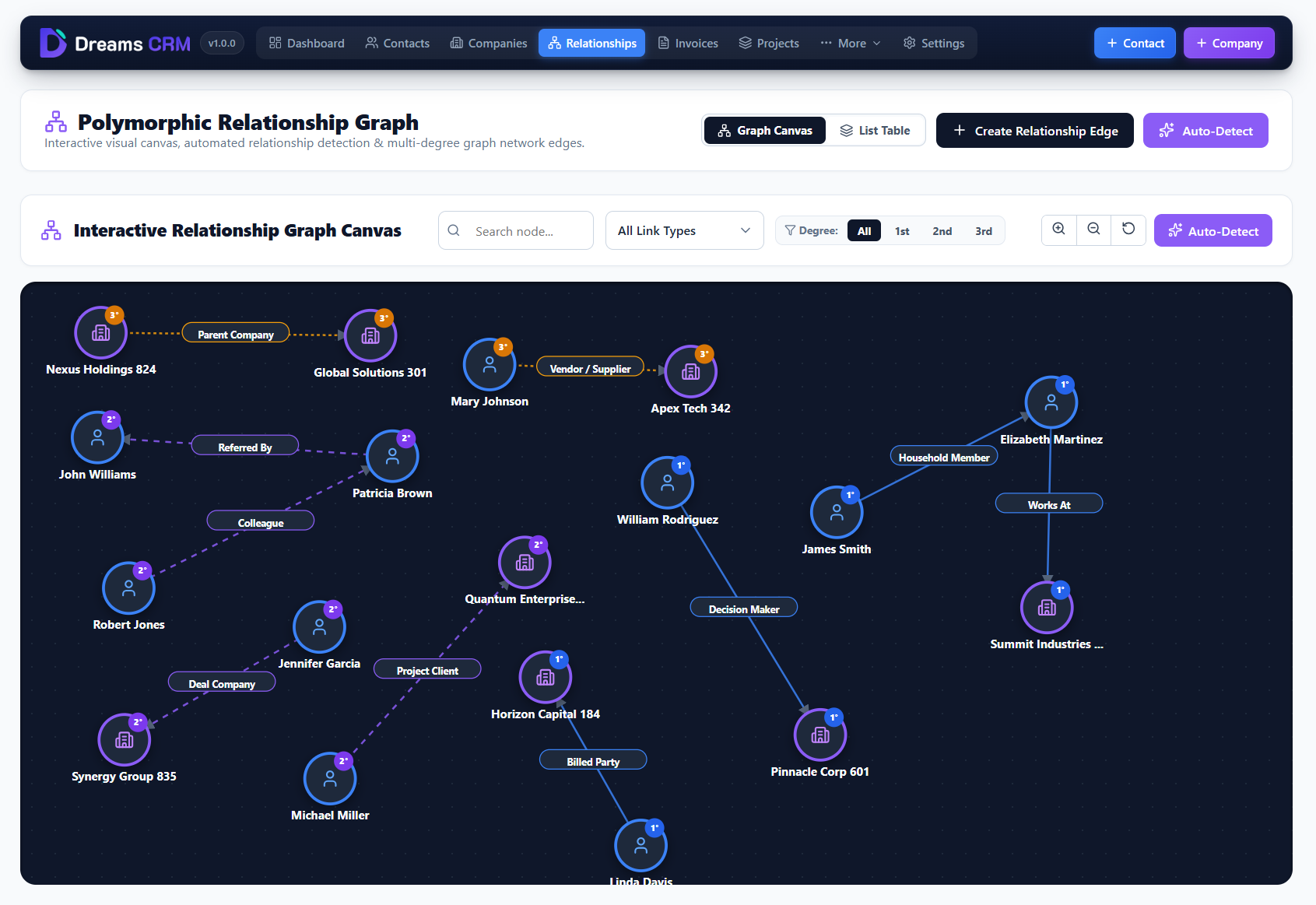
Figure 3.8: Interactive Relationship Node Canvas Graph.
Step-by-Step User Guide: Navigating the Relationship Canvas
- Canvas Pan & Zoom: Click and drag on the canvas background to pan across large networks. Use the mouse scroll wheel or the zoom controls in the corner to zoom in for detailed inspection or zoom out for a high-level network topology overview.
- Rearranging Nodes: Drag any node (Contact, Company, Deal) with your mouse. The physics simulation smoothly repositions connected link lines in real time.
- Opening Entity Inspector: Click on any node circle to open the entity's slide-out drawer, displaying its profile attributes, open deal values, and quick communication buttons.
- Filtering Entity Types: Use the top filter buttons to isolate specific relationships (e.g. show only Company-to-Contact employment links, or Contact-to-Deal stakeholder links).
Supported Entity Link Relationship Types
works_at— Links a Contact node to an employer Company node.decision_maker— Designates a Contact as a key stakeholder on a Deal opportunity.referred_by— Tracks peer-to-peer customer referral links between Contacts.associated_with— Connects external vendor or subsidiary accounts.
Automates lead prioritization and database hygiene using customizable scoring rules, activity event weightings, and Levenshtein-distance fuzzy matching algorithms.
Predictive Scoring Rule Engine
- Email Engagement: +5 points per click, +2 points per open.
- Form Submissions: +15 points for Contact Form 7 lead form submissions.
- Demographic Matching: +25 points for corporate domain matching.
- Inactivity Decay: Automatically degrades score by 10% after 30 days of continuous inactivity.
Step-by-Step User Guide: Running Deduplication & Merging Records
- Running a Batch Dedup Scan: Navigate to Dreams CRM → Contacts → Deduplication and click Run Deduplication Scan. The background runner evaluates contact records using exact and fuzzy matching on email address, phone number digits, and name similarity.
- Reviewing Candidate Pairs: Identified potential duplicate pairs appear in the Deduplication Queue with a similarity match percentage badge (e.g. 95% Similarity).
- Side-by-Side Merge Inspection: Click Review & Merge on any pair to open the side-by-side comparison modal. Choose which record serves as the Master Record and select field-by-field which email, phone, or company attribute to retain.
- Executing the Safe Merge: Click Confirm & Merge. The engine moves all deals, notes, calls, tasks, and audit logs from the duplicate into the master record in a single database transaction, and removes the redundant record without data loss.
The A/B Split Testing & Sales Funnel module empowers growth and marketing teams to configure multi-variant experiments, track step-by-step conversion drop-offs, and monitor conversion metrics directly inside WordPress.
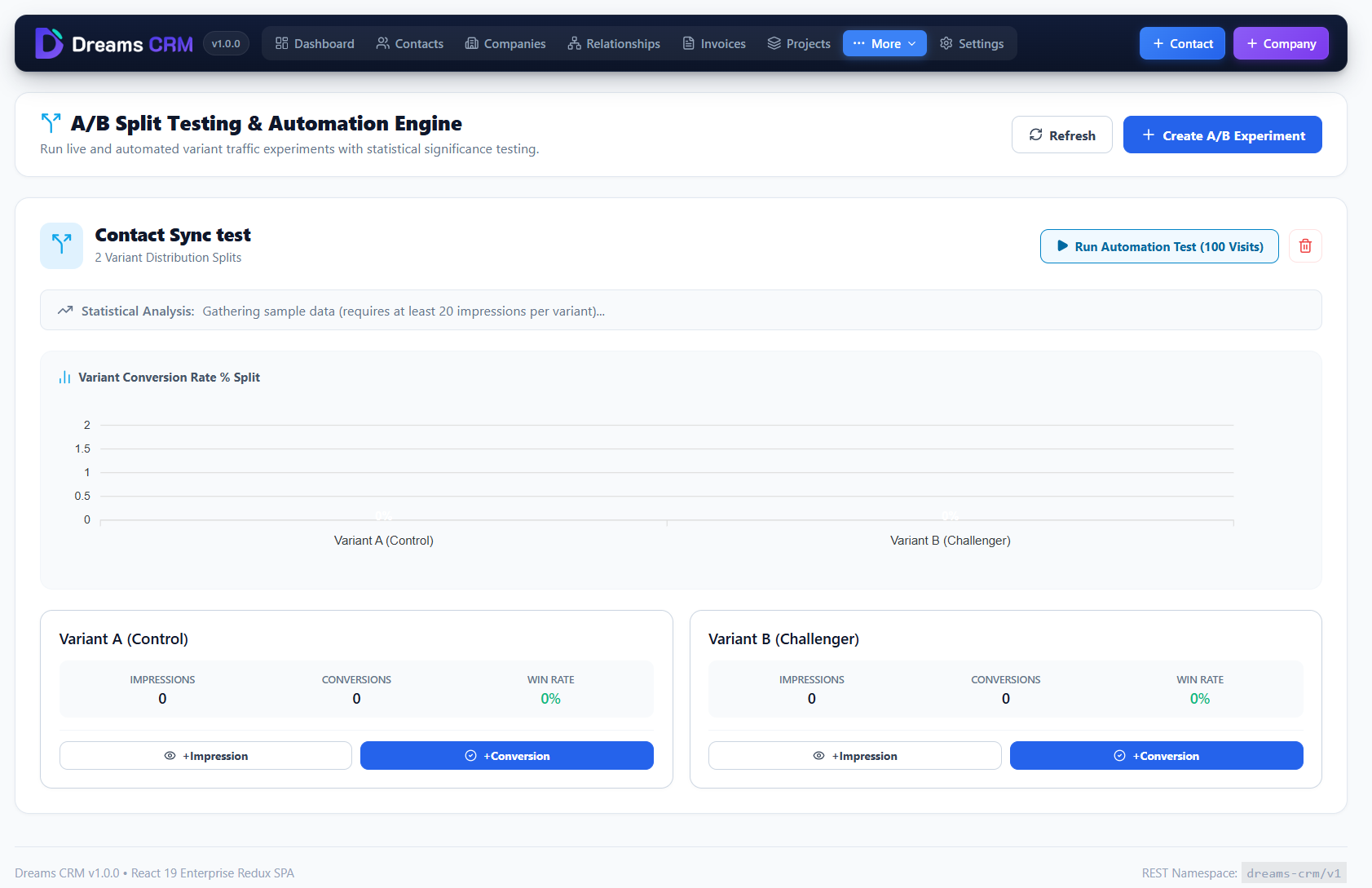
Figure 3.10: Dreams CRM A/B Split Testing & Conversion Funnel Experiments.
Step-by-Step User Guide: Launching an A/B Test
- Creating a Test: In the A/B Testing module, click + Create New Test. Enter the Experiment Title and select the conversion goal type (e.g. Form Submission, Deal Created, or WooCommerce Checkout).
- Defining Variants: Configure Variant A (Control) and Variant B (Variant). Allocate traffic percentage splits (e.g. 50% / 50% or 70% / 30%).
- Tracking Funnel Progression: As visitors
interact with your site, impressions and conversion events are logged
into
wp_dcrm_ab_logs. Real-time conversion percentage graphs visualize performance side-by-side. - Declaring a Winner: When a variant reaches statistical confidence (> 95%), click Declare Winner to automatically route 100% of future traffic to the winning configuration.
Key Experimentation Features
Multi-Variant Split Tests
Test landing pages, promotional headlines, or checkout flows with randomized traffic distribution.
Funnel Drop-Off Stages
Track visitors from Initial Visit ➔ Lead Capture ➔ Deal Opportunity ➔ Won Conversion with stage-by-stage percentages.
Statistical Winner Declaration
Computes conversion rate deltas and statistical confidence to automatically identify winning variants.
Dispatches personalized HTML broadcast and drip campaigns to targeted segments.
Manages templates in wp_dcrm_email_templates and processes delivery
queues via wp_dcrm_email_queue and Action Scheduler for zero mail
server throttling.
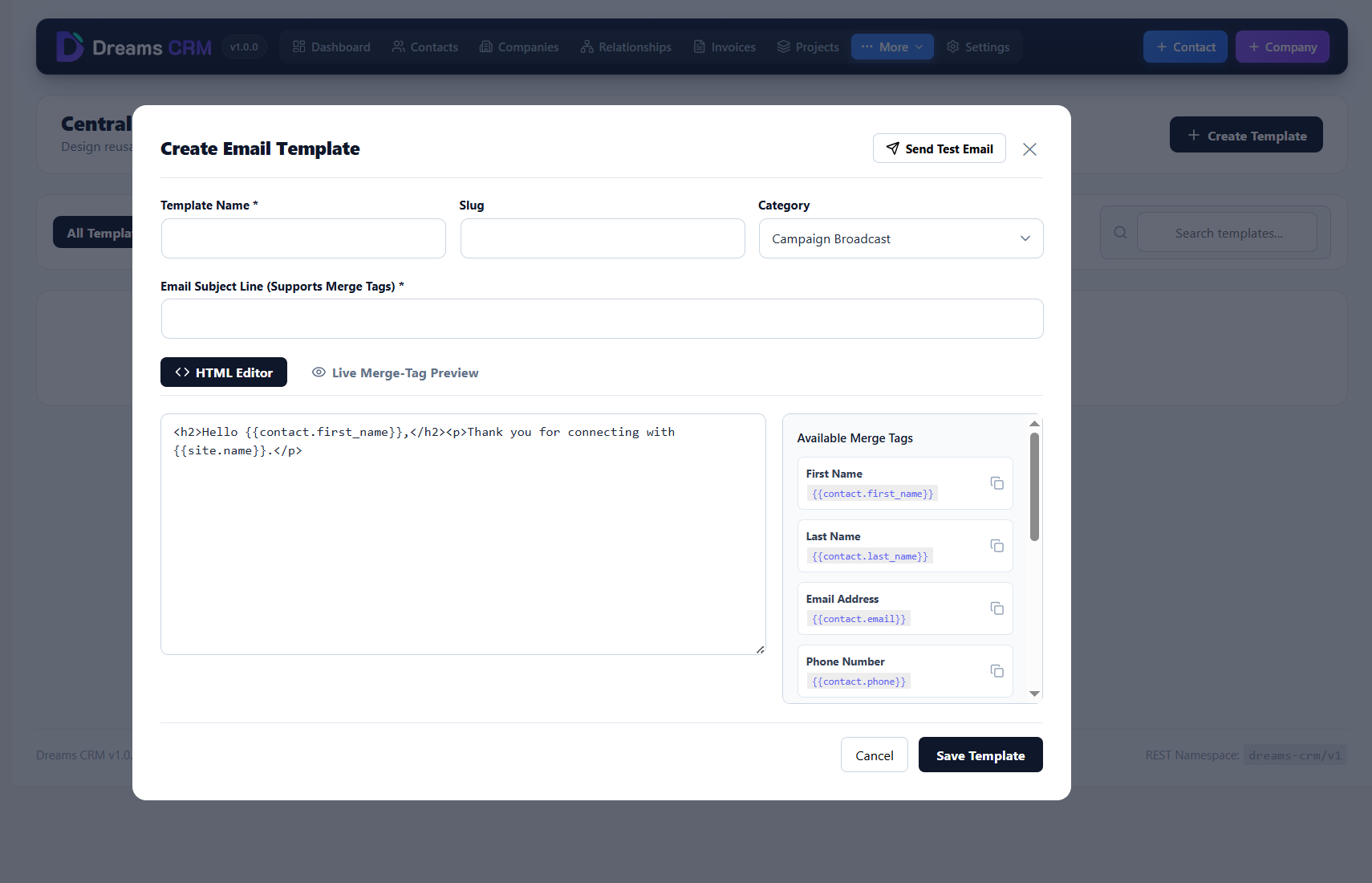
Figure 3.11: Dreams CRM Email Template Designer & Campaign Queue.
Step-by-Step User Guide: Designing Templates & Sending Campaigns
- Creating Reusable Email Templates: Navigate to Campaigns → Email Templates and click + Create Template. Compose mobile-responsive HTML layouts with header logos, formatted text, call-to-action buttons, and compliant footer unsubscribe links.
- Injecting Dynamic Merge Tags: Personalize
email copy using merge tags like
{{first_name}},{{last_name}},{{company_name}}, or custom field tokens. The delivery engine replaces these tokens with recipient values at send time. - Dispatching a Test Email: Click Send Test Email and enter your inbox address to inspect desktop and mobile layout rendering before sending to your contact list.
- Configuring & Launching Campaigns: Click + New Campaign. Select your target recipient audience (filtered by Lifecycle Stage, Deal Pipeline, or Custom Tag), pick your email template, and set the send schedule (Immediate or Scheduled).
- Action Scheduler Throttled Queue: Outgoing
emails enter
wp_dcrm_queue. The Action Scheduler automatically dispatches batches of 50 emails per interval to maintain high deliverability and avoid SMTP rate limits. Real-time open and click telemetry is recorded inwp_dcrm_events.
Key Campaign Capabilities & Features
- Visual HTML Template Designer: Craft
mobile-responsive email layouts with live preview, dynamic personalization
tokens (
{{first_name}},{{company_name}},{{lead_score}}), and test email dispatcher. - Automated Throttled Batch Dispatcher: Sends queued emails in batches of 50 via WP-Cron or Action Scheduler, preventing web host SMTP rate limits and blacklisting.
- Live Engagement Telemetry: Embeds transparent tracking pixels and tracked redirect hyperlinks to record open rates, clicks, and bounce diagnostics in real time.
- Dynamic Segment Resolution: Automatically resolves targeted recipient criteria (by contact stage, deal status, or custom tags) at send time.
Enables friction-free bulk data migration into and out of Dreams CRM. Supports Contacts, Companies, Leads, and Deals with intelligent column auto-detection, CSV/JSON file ingestion, and comprehensive backup exports.
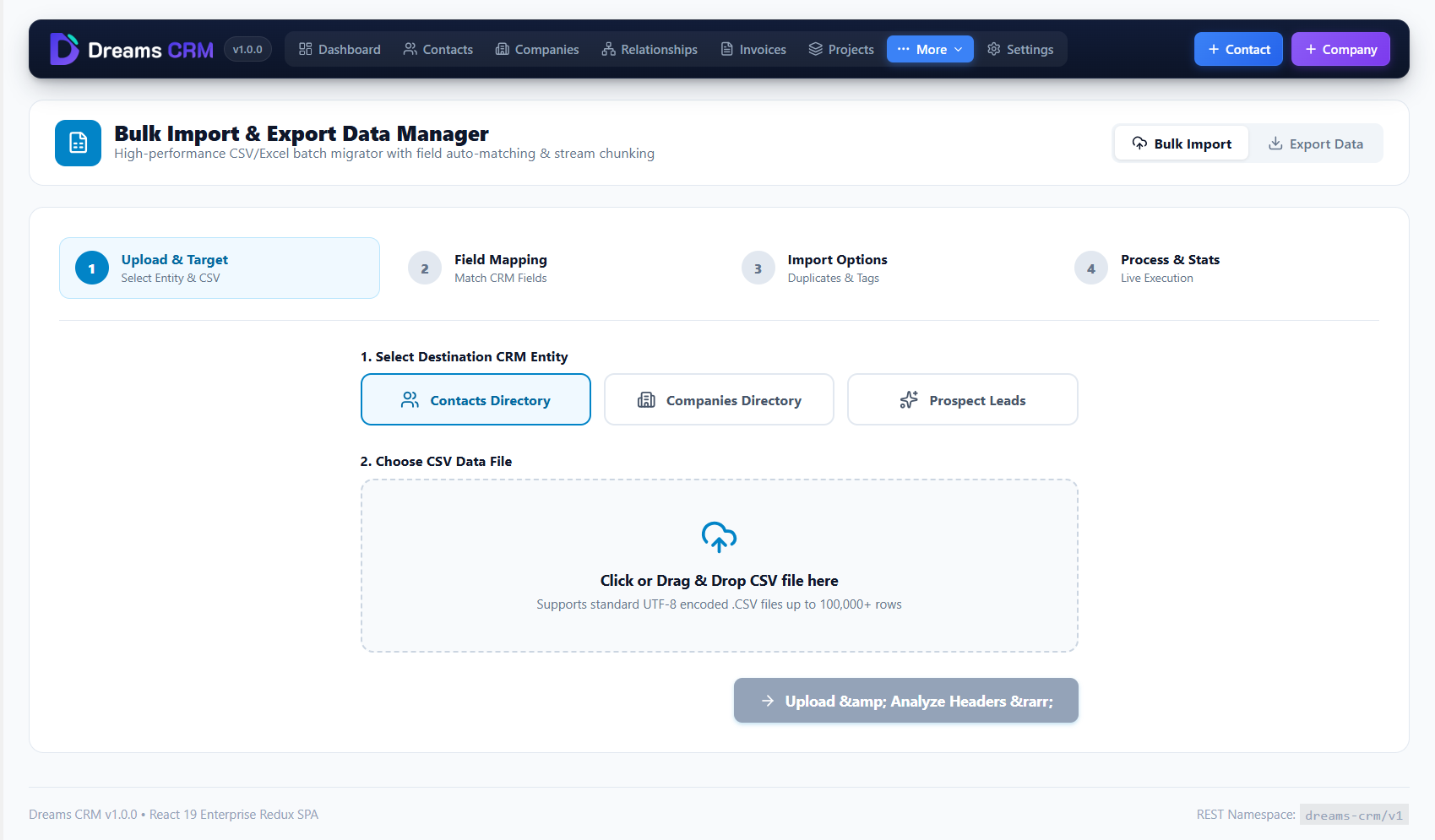
Figure 3.12: Dreams CRM Bulk Import & Export Migration Interface.
Step-by-Step User Guide: Bulk Data Migration
- Downloading Sample CSV Templates: Click Download Template for Contacts, Companies, or Leads to review required column headers and sample data formats.
- Uploading Spreadsheet: Drag and drop your CSV or JSON file into the upload zone. The engine reads header rows and displays the visual field mapping screen.
- Mapping Columns to CRM Fields: The visual mapper automatically matches common column names (e.g. First Name ➔ first_name, Email Address ➔ email). Adjust any custom field mappings manually using the dropdown selectors.
- Configuring Duplicate Collision Rules: Choose how to handle records with matching emails: Skip Duplicates (preserves existing record untouched), Update Existing (overwrites with newer spreadsheet values), or Create New (forces new record creation).
- Executing Background Import: Click Start Import. An asynchronous batch worker imports records in chunks of 100 with a live progress indicator bar. An import summary report details total imported, skipped, and error rows.
Import & Export Workflow Capabilities
Flexible CSV & JSON Import
Upload spreadsheet exports from HubSpot, Salesforce, Zoho, or custom CSVs with visual drag-and-drop column mapping and duplicate resolution options.
Filtered Backup Exports
Export filtered CRM datasets by lifecycle stage, date range, or assigned owner into standard CSV or JSON format for compliance and reporting.
Connects Contact Form 7 submissions directly to Dreams CRM. Mail-tags (e.g.
[your-name], [your-email]) are mapped to CRM fields in
wp_dcrm_cf7_feeds with automatic background retry handling.
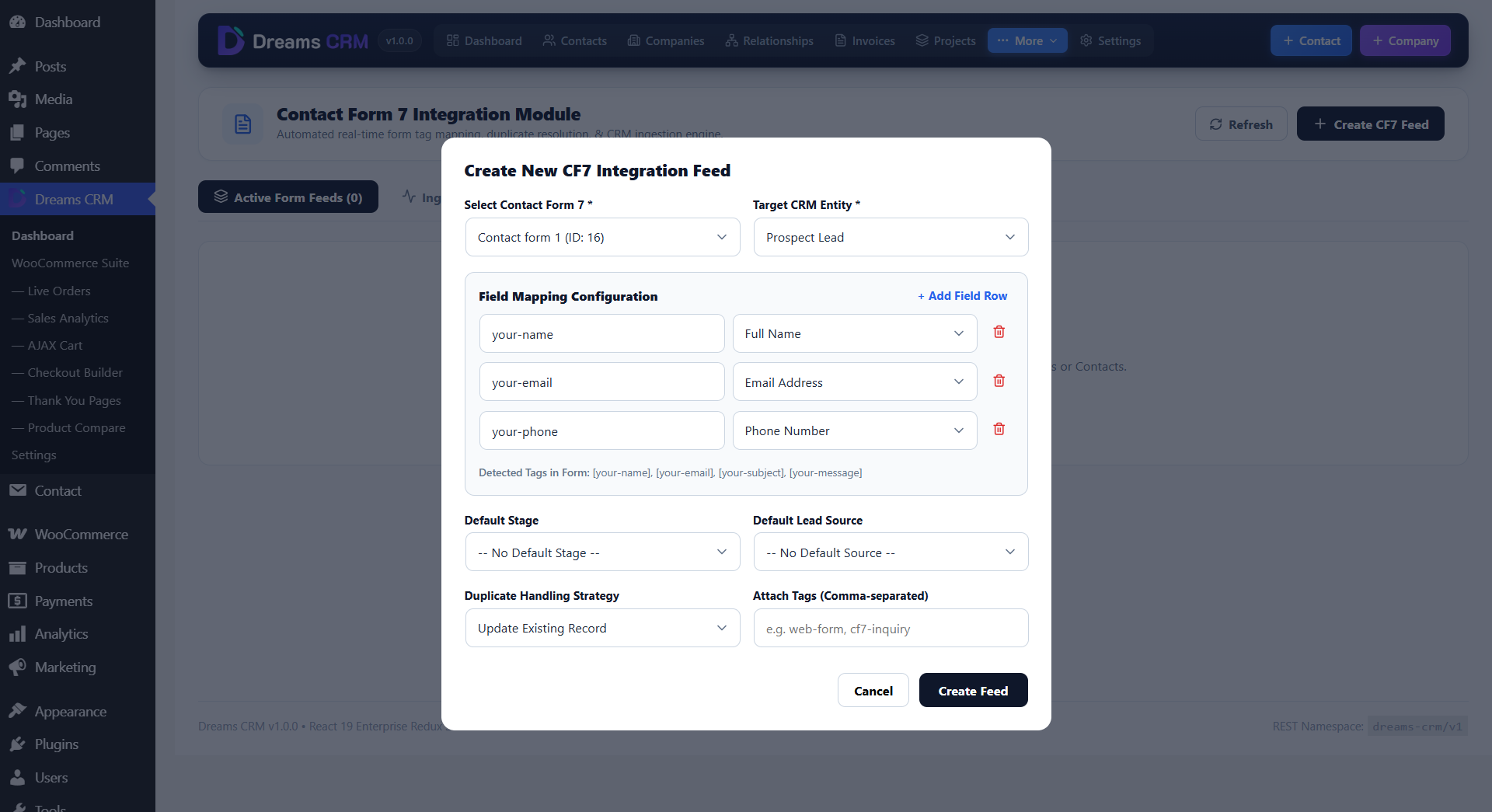
Figure 3.13: Contact Form 7 Field Mapping & Ingestion Manager.
Step-by-Step User Guide: Connecting CF7 Forms
- Creating an Ingestion Feed: Under Dreams CRM → Settings → Contact Form 7, click + Add New Feed.
- Selecting Your Target Form: Choose the target Contact Form 7 form from the dropdown list of forms installed on your WordPress site.
- Mapping CF7 Tags to CRM Fields: Pair form
tags to CRM attributes (e.g.
[your-name]➔ Contact Name,[your-email]➔ Contact Email,[your-phone]➔ Phone,[your-message]➔ Activity Note). - Default Stage & Sales Owner: Select the default Lifecycle Stage for submissions (e.g. Lead) and assign an internal sales rep to automatically receive newly captured prospects.
- Testing Submission: Submit a test entry through your site's contact form. The entry instantly generates a new contact profile in Dreams CRM, logs the message into the activity stream, and increments the predictive lead score.
Deduplication Strategies
- Update Existing Record: Overwrites contact attributes if matching email address is found.
- Skip Duplicate: Ignores incoming submission if
contact already exists in
wp_dcrm_contacts. - Create New Record: Always creates a new contact profile regardless of existing records.
Dreams CRM provides a centralized, reactive administration center that gives administrators complete command over system behavior, enabled workspace modules, sales pipeline definitions, dynamic lead scoring weights, master taxonomies, and transactional email transports.
The Settings Hub is organized into four core categories with real-time keyword search filtering:
Core & Modules
Module Manager, General Preferences, Data Retention & Seeder, and Developer API Docs.
Sales & Pipelines
Sales Pipelines & Stages, Predictive Scoring Rules, and Stage Lifecycle Registries.
Dictionary & Taxonomies
Lead Sources, Lost Deal Reasons, Industries, Call Reasons, Testimonials, FAQs, and Geographic Locations.
Email & ESP
SMTP transports (Custom SMTP, SendGrid, Mailgun, SES, Postmark) and Live Test Broadcast Dispatcher.
3.14.1 Organization & Regional Preferences
Configures primary brand identity, legal organization details, corporate headquarters contacts, and financial localization standards. These settings automatically brand generated PDF invoices, customer notifications, and currency displays throughout the entire CRM.
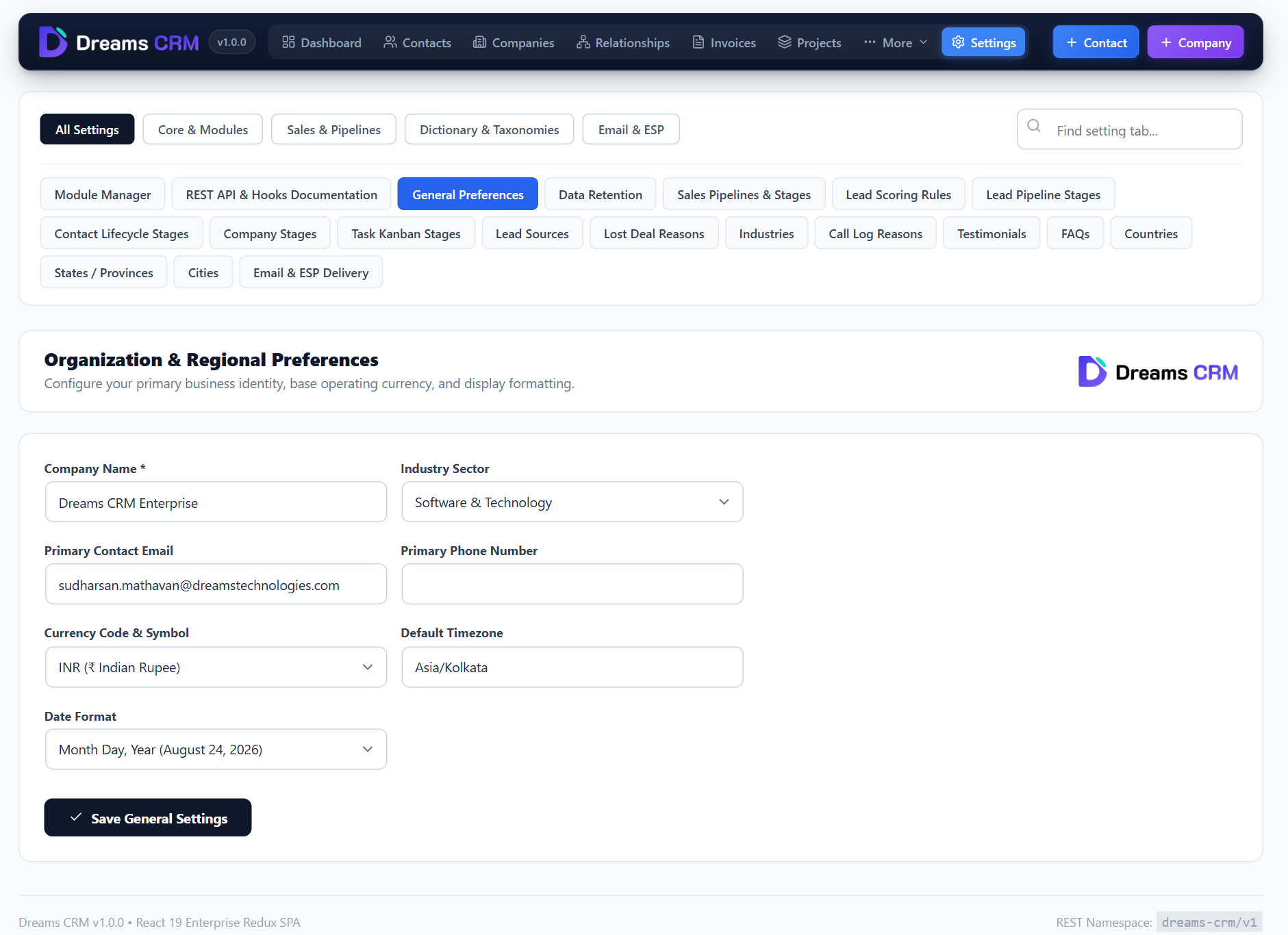
Figure 3.14.1: Organization & Regional Preferences Configuration.
Key Configuration Options
| Setting Field | Type / Format | Functional Description & System Impact |
|---|---|---|
| Company Name | string (required) |
Legal corporate business name displayed on invoice headers, customer portals, and outbound email signatures. |
| Industry Sector | select dropdown |
Primary operating vertical (e.g. Software & Technology, Healthcare, Manufacturing) used for default benchmarking. |
| Primary Contact Email | email string |
Official organization contact address used as the default sender and return-path for CRM transactional notifications. |
| Primary Phone Number | tel string |
Main corporate contact phone number printed on invoice footers and contact correspondence. |
| Currency Code & Symbol | select dropdown |
Sets base operating currency (e.g. USD $, EUR €, GBP £, INR ₹, AUD $, CAD $, JPY ¥). Drives all financial valuations, pipeline deal totals, and invoice calculations. |
| Default Timezone | select dropdown |
Standardized timezone (e.g. Asia/Kolkata,
America/New_York, UTC) applied to
activity timestamps, scheduled email broadcasts, and task
deadlines.
|
| Date Format | select dropdown |
User-preferred date display format across tables and logs (e.g. Month Day, Year, DD/MM/YYYY, or YYYY-MM-DD). |
3.14.2 Dreams CRM Modules Manager
The Module Manager delivers granular control over CRM feature sets. Administrators can selectively enable or disable individual modules to tailor the workspace to specific organizational workflows or streamline navigation for sales agents.
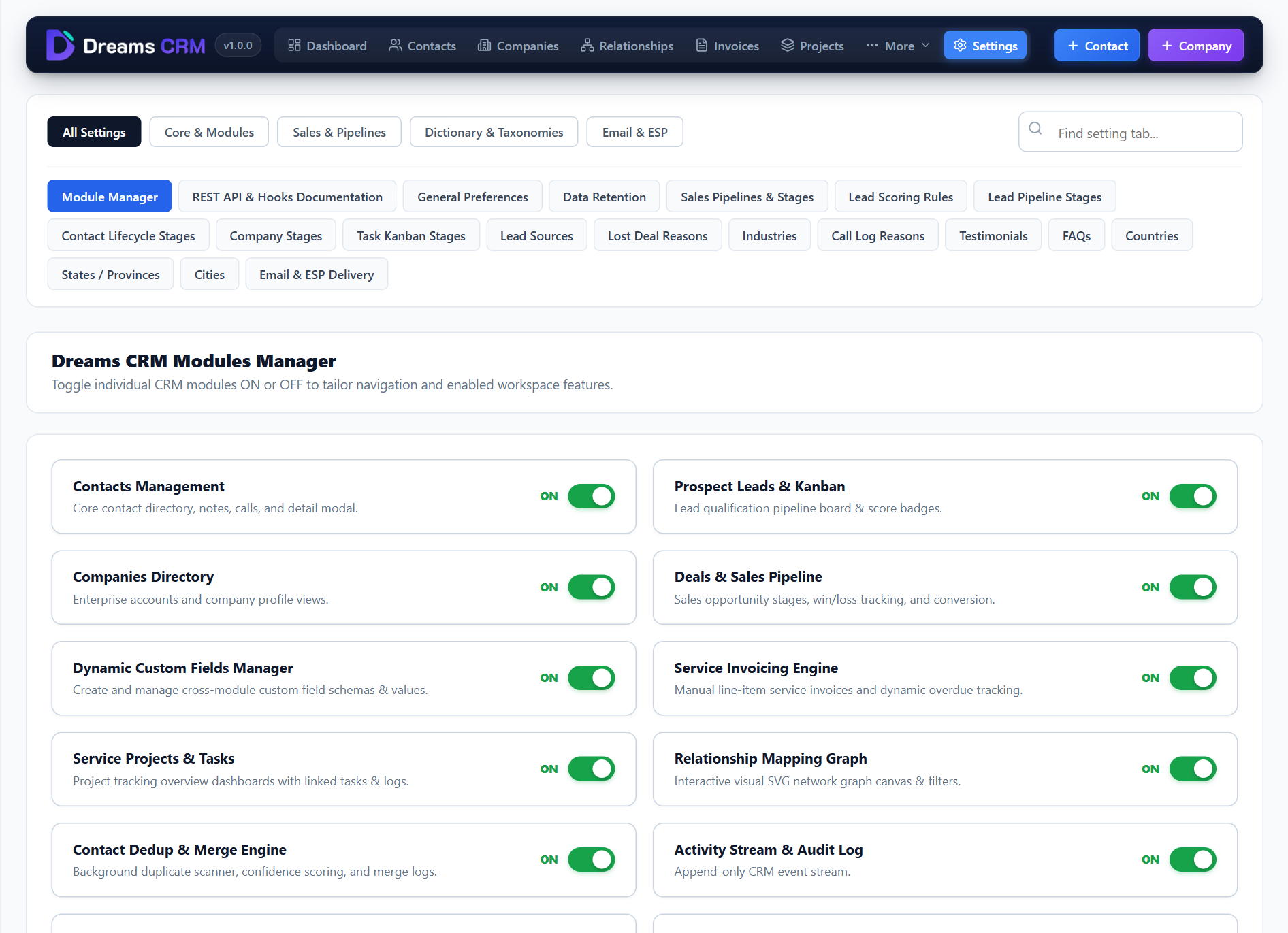
Figure 3.14.2: Dreams CRM Modular Feature Toggle Grid.
All 20 Configurable Modules
| Module Name | Key Identifier | Functional Scope |
|---|---|---|
| Contacts Management | contacts |
Core contact directory, notes, calls, communications log, and detail modals. |
| Prospect Leads & Kanban | leads |
Lead qualification pipeline board, scoring badges, and convert-to-deal workflow. |
| Companies Directory | companies |
Enterprise accounts directory, employee associations, and account profiles. |
| Deals & Sales Pipeline | deals |
Multi-stage sales opportunity pipeline, win/loss probabilities, and revenue conversion. |
| Dynamic Custom Fields Manager | custom_fields |
Cross-module dynamic custom field schemas, types (text, number, date, select), and validations. |
| Service Invoicing Engine | invoices |
Manual line-item service billing, tax calculations, PDF generation, and overdue tracking. |
| Service Projects & Tasks | projects |
Post-sale client delivery workspaces, milestone progress, linked task boards, and work logs. |
| Relationship Mapping Graph | relationships |
Interactive visual SVG network graph canvas displaying multi-entity corporate hierarchies. |
| Contact Dedup & Merge Engine | dedup |
Multi-pass duplicate scanner, fuzzy confidence scoring, and side-by-side record merge tools. |
| Activity Stream & Audit Log | activity |
Append-only CRM event stream recording logins, record updates, exports, and stage changes. |
| Analytics & Reporting | reports |
Executive visual charts, pipeline velocity, agent performance metrics, and exportable reports. |
| Revenue Attribution Engine | attribution |
Storefront tracking beacon, first/last-touch campaign attribution, and WooCommerce revenue tie-back. |
| Sales & Marketing Funnels | funnels |
Step-by-step visitor journey mapping, stage drop-off rates, and conversion bottlenecks. |
| A/B Split Testing | abtests |
Landing page and campaign variant performance comparison with statistical win declaration. |
| Campaign Email Management | campaigns |
Targeted audience rule-builder, scheduled broadcast dispatcher, and engagement tracking. |
| Central Email Templates | templates |
Reusable responsive HTML email templates with dynamic merge tag personalization tokens. |
| Bulk Import & Export Data Manager | import_export |
High-performance CSV/Excel batch migrator with auto-column matching and chunked execution. |
| User Management & Granular RBAC | users_roles |
Custom role builder, 18+ capability matrix toggles, and user assignment permissions. |
| Contact Form 7 Integration Module | cf7_integration |
Real-time form tag mapping, duplicate handling rules, and automatic lead creation. |
| WooCommerce Suite & Connect | woo_suite |
Live store order stream, sales analytics, AJAX cart drawer, checkout customizer, and product compare. |
3.14.3 Sales Pipelines & Stage Configuration
Tailors your sales cycles to match distinct operational processes. Administrators can configure multiple distinct pipelines (e.g. Inbound Sales, Enterprise Retainers, Partner Channels) and customize the exact sequence of deal stages.
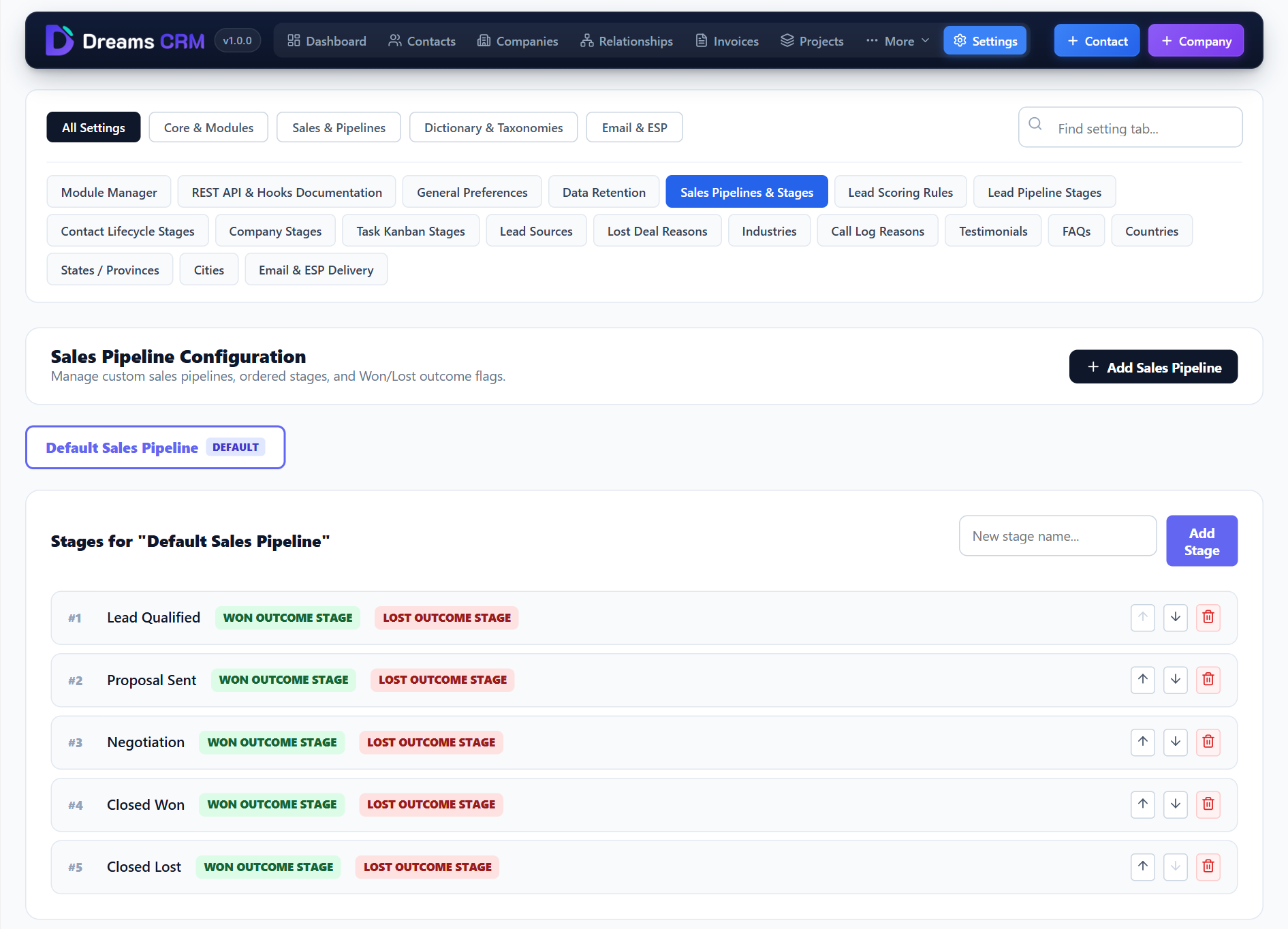
Figure 3.14.3: Custom Sales Pipelines and Stage Outcome Flags.
Stage Capabilities & Won/Lost Outcome Flags
- Custom Stage Creation: Define customized deal steps (e.g. Lead Qualified ➔ Discovery Call ➔ Proposal Sent ➔ Negotiation ➔ Closed Won).
- Visual Stage Reordering: Click the Up and Down arrows to adjust stage ordering in the deal Kanban board and analytics funnels.
- Outcome Designators: Mark terminal stages
explicitly with
WON OUTCOME STAGEorLOST OUTCOME STAGE. When a deal reaches a designated Won or Lost stage:- The system automatically records the completion timestamp and computes cycle duration.
- For lost deals, a prompt requests the specific Lost Reason for post-mortem reporting.
- Pipeline conversion KPIs and win-rate charts update in real time.
3.14.4 Predictive Lead Scoring Rules Engine
The Lead Scoring Rules Engine dynamically evaluates prospect engagement and assigns points based on online behavior, store interactions, and campaign responses. It blends raw event weights with algorithmic Recency, Frequency, and Monetary (RFM) exponential decay mathematics.
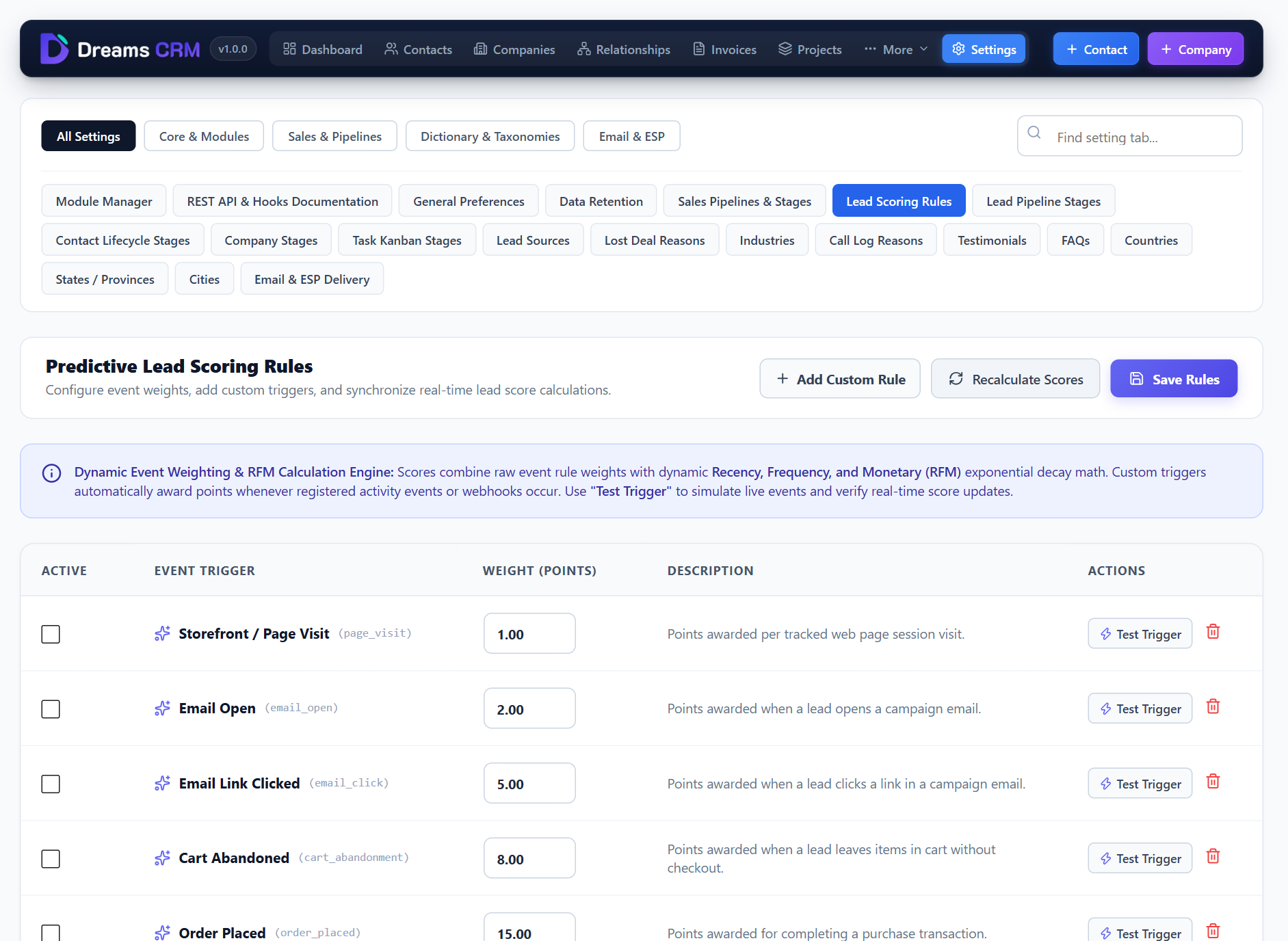
Figure 3.14.4: Lead Scoring Event Triggers & Weight Customizer.
Standard Scoring Triggers
| Event Trigger | Event Key | Default Weight | Scoring Description |
|---|---|---|---|
| Storefront / Page Visit | page_visit |
+1.00 pt | Points awarded per tracked web page session visit captured via the beacon snippet. |
| Email Open | email_open |
+2.00 pts | Points awarded when a prospect opens an outbound HTML campaign broadcast. |
| Email Link Clicked | email_click |
+5.00 pts | Points awarded when a recipient clicks a tracked redirect hyperlink in an email. |
| Cart Abandoned | cart_abandonment |
+8.00 pts | High-intent indicator awarded when a shopper leaves items in cart without completing checkout. |
| Order Placed | order_placed |
+15.00 pts | Maximum engagement score awarded for completing a WooCommerce checkout transaction. |
Lead Scoring Workflow Operations
- Custom Event Rules: Click + Add Custom Rule to define organization-specific triggers (e.g. Webinar Attended, Whitepaper Downloaded, or negative point penalties for Unsubscribes).
- Interactive Rule Testing: Click Test Trigger beside any rule to immediately simulate a live telemetry event against a contact profile and verify instant score recalculation.
- Batch Recalculation: Clicking Recalculate Scores launches a background worker that re-evaluates all historical events against updated rule weights across the entire database.
3.14.5 Dictionary, Taxonomies & Master Registries
Standardizes data entry across your sales and support teams. By defining central lookup tables, Dreams CRM eliminates typos, ensures consistent dropdown selections, and enables structured analytics across all CRM modules.
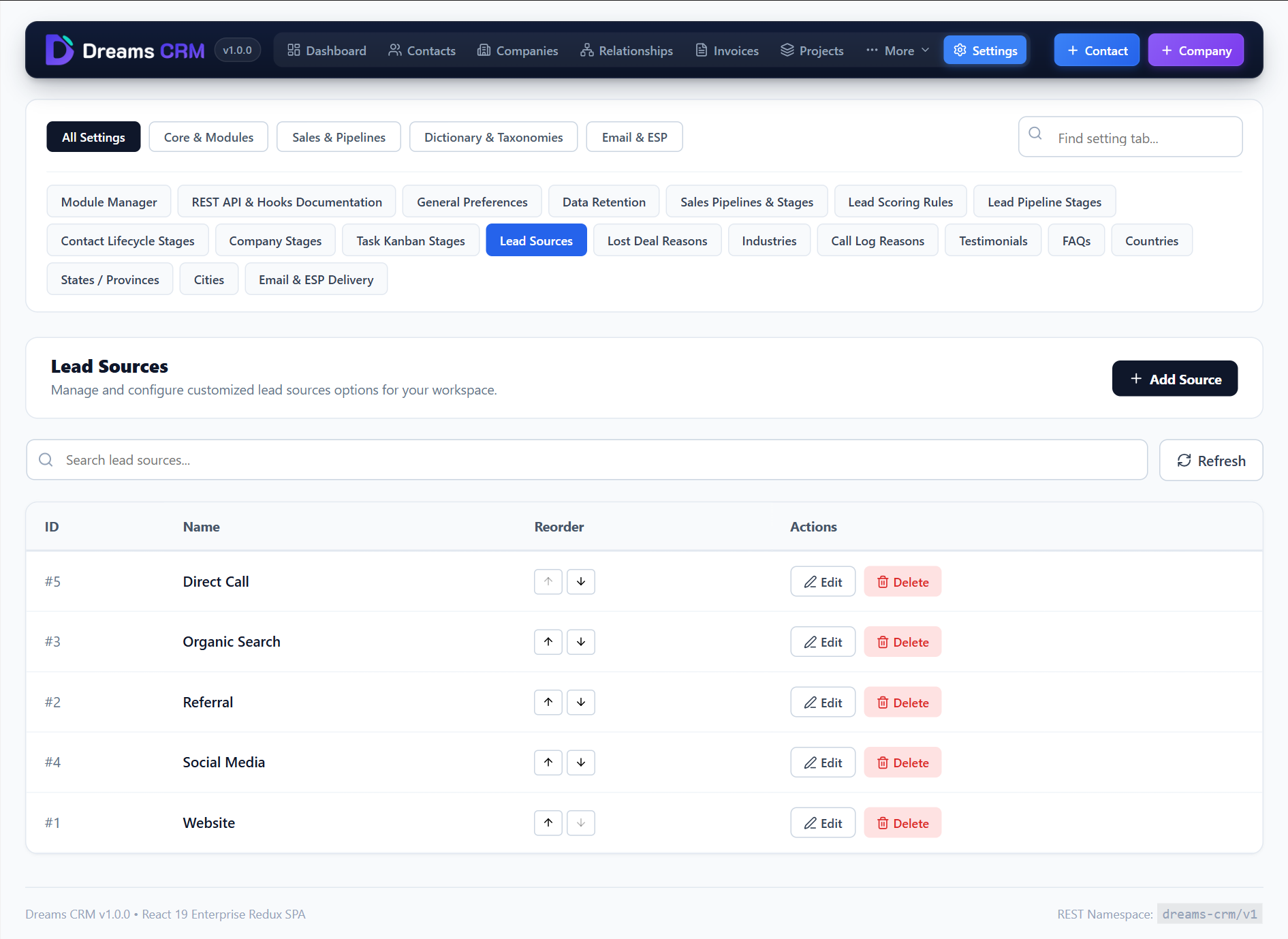
Figure 3.14.5a: Lead Sources Taxonomy Registry.
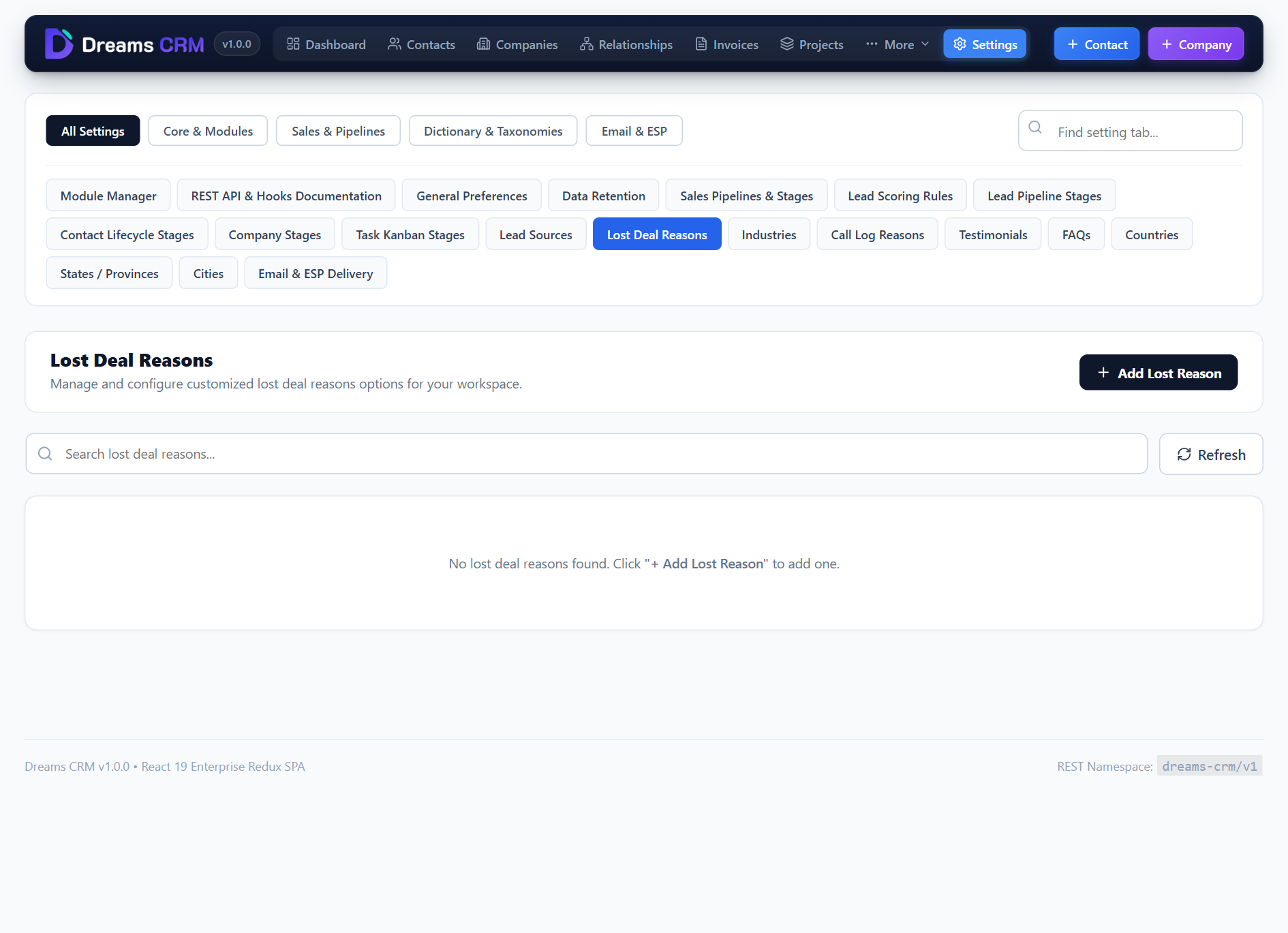
Figure 3.14.5b: Lost Deal Reasons Taxonomy Registry.
Supported System Taxonomies
Lead Sources
Track where prospects originate: Direct Call, Organic Search, Referral, Social Media, Website, and Paid Advertising.
Lost Deal Reasons
Understand why deals fail: Price Point Too High, Selected Competitor, Budget Frozen, Feature Gap, and Client Unresponsive.
Industries
Industry sector classification for company accounts: Software & Technology, Finance & Banking, Healthcare, Retail, etc.
Call Log Reasons
Categorize telephone interactions: Discovery Call, Demo Presentation, Contract Review, and Account Check-in.
Testimonials & FAQs
Maintain pre-approved client quotes and frequently asked objection-handling questions accessible within deal notes.
Geographic Locations
Relational three-tier hierarchy: Countries (with ISO-2 codes) ➔ States / Provinces ➔ Cities for cascading address fields.
3.14.6 Email Delivery & ESP Configuration
Dreams CRM features an enterprise SMTP and Email Service Provider (ESP) delivery engine designed to ensure 99%+ deliverability for marketing campaigns, invoice notifications, and lead alerts.
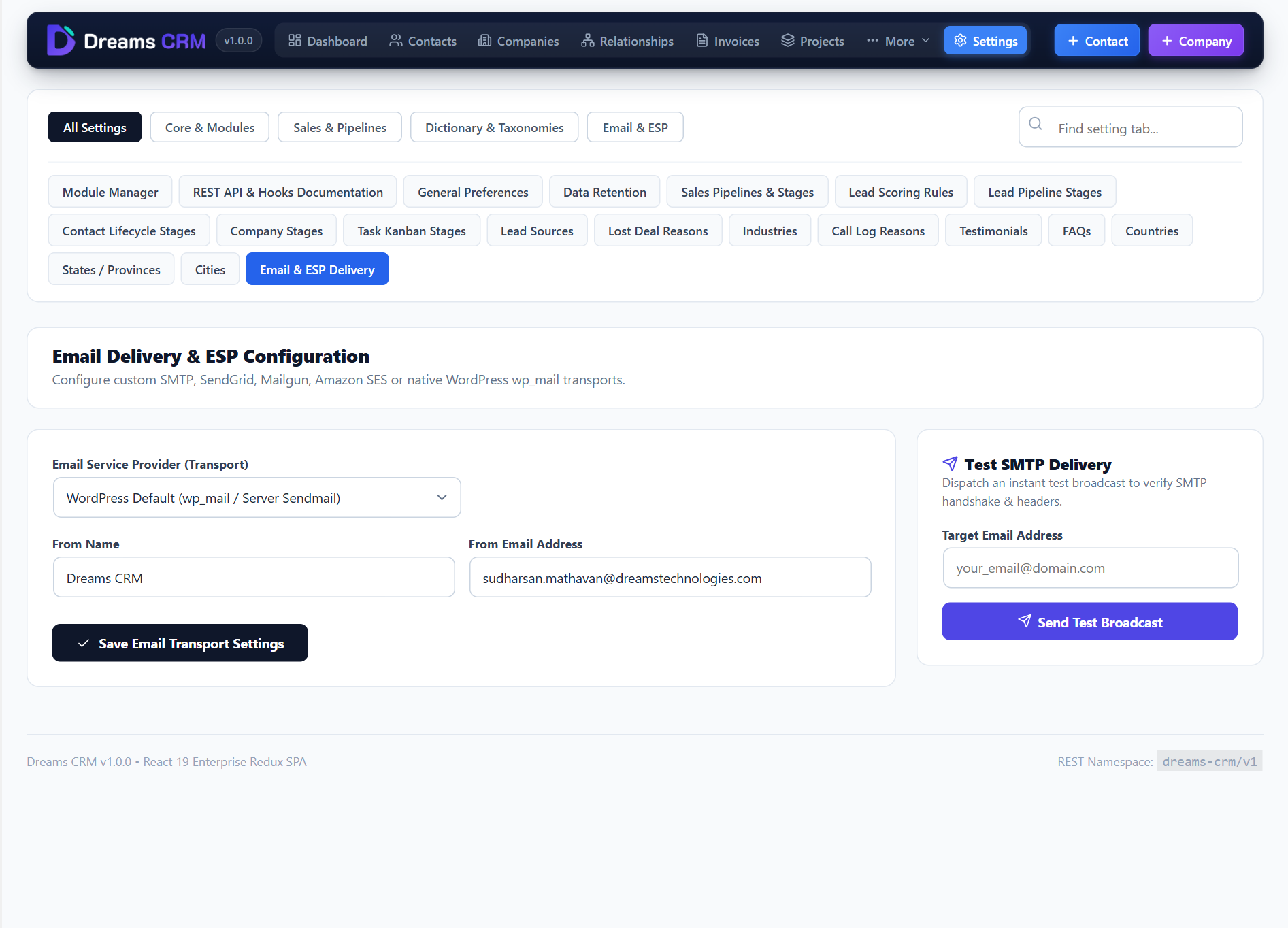
Figure 3.14.6: Email Delivery Settings & Instant SMTP Tester.
Supported Delivery Transports
- WordPress Default (wp_mail): Uses the web
server's native
sendmaildaemon. Recommended only for local testing and lightweight notifications. - Custom Authenticated SMTP: Connects to corporate mail servers, Google Workspace, Microsoft 365, or dedicated relays using TLS (Port 587) or SSL (Port 465).
- Cloud ESP Providers: Direct API / relay integration with high-volume deliverability engines: SendGrid Mailgun Amazon SES Postmark
Built-In SMTP Delivery Tester
Before launching live campaigns, verify that your SMTP credentials and DNS SPF/DKIM records are properly configured:
- Enter your personal inbox in the Target Email Address field on the right-hand panel.
- Click Send Test Broadcast.
- Dreams CRM executes an immediate socket handshake, authenticates with the remote SMTP server, and delivers a diagnostic HTML test email with full header verification.
3.14.7 Data Retention, Seeding & Maintenance
Provides critical database maintenance tools for system administrators, staging environment developers, and staging sandbox onboarding.
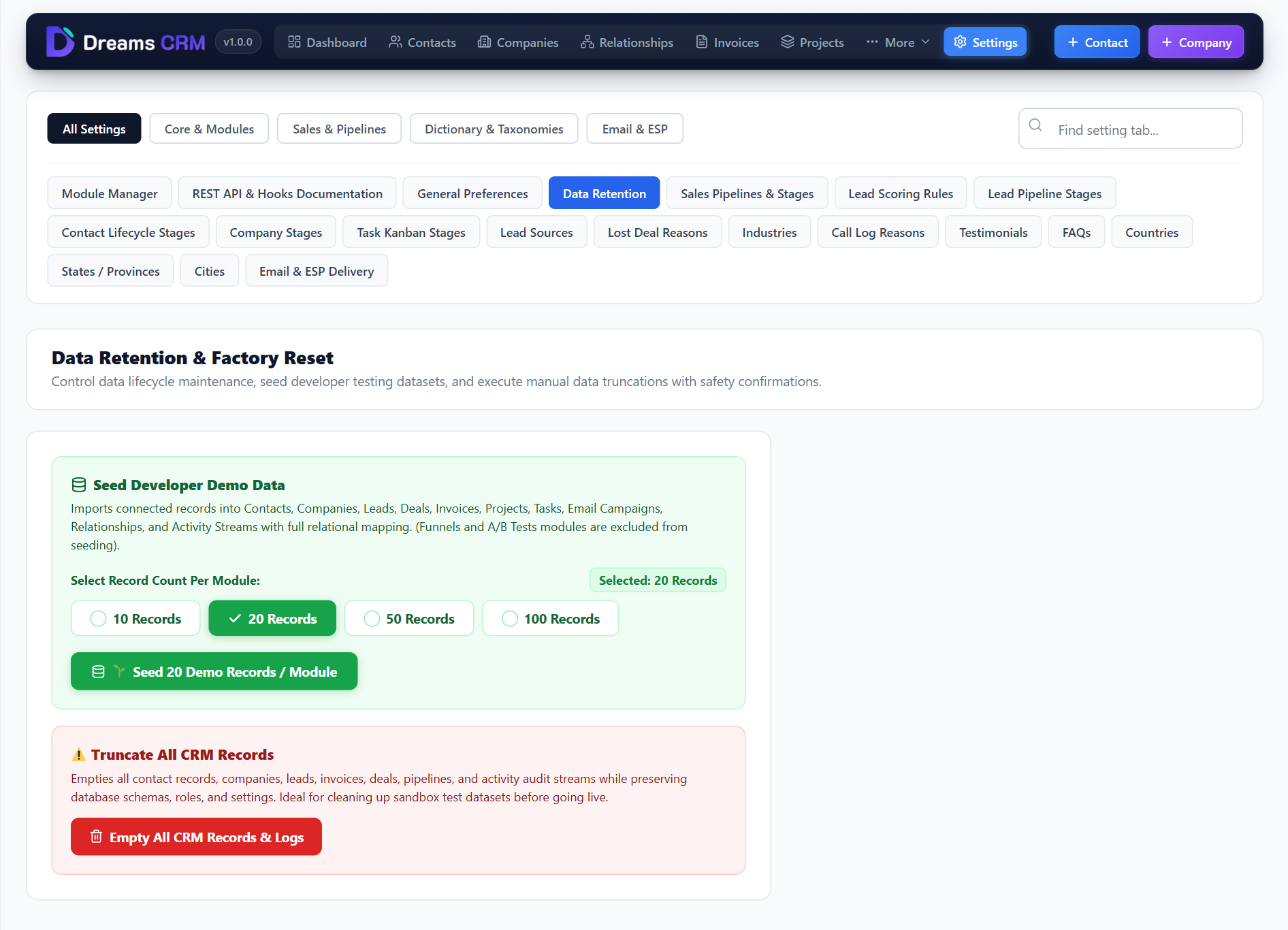
Figure 3.14.7: Developer Demo Data Seeder and Safe Truncate Tool.
Seed Developer Demo Data
Populates realistic, interconnected test records into Contacts, Companies, Leads, Deals, Invoices, Projects, Tasks, and Activity Streams with full relational mapping.
Supported Quantities: 10, 20, 50, or 100 records per module with realistic names, enterprise companies, phone numbers, deal stages, and financials.
Truncate All CRM Records (Safe Purge)
Empties all contact records, companies, leads, invoices, deals, pipelines, and activity audit streams while strictly preserving database schemas, roles, permissions, custom field definitions, and global settings.
Requires an explicit admin confirmation dialog to prevent accidental data loss.
3.14.8 In-App REST API & Developer Hub
Developers can access an interactive REST API reference and live console directly within the Settings dashboard without opening external documentation or third-party API clients.
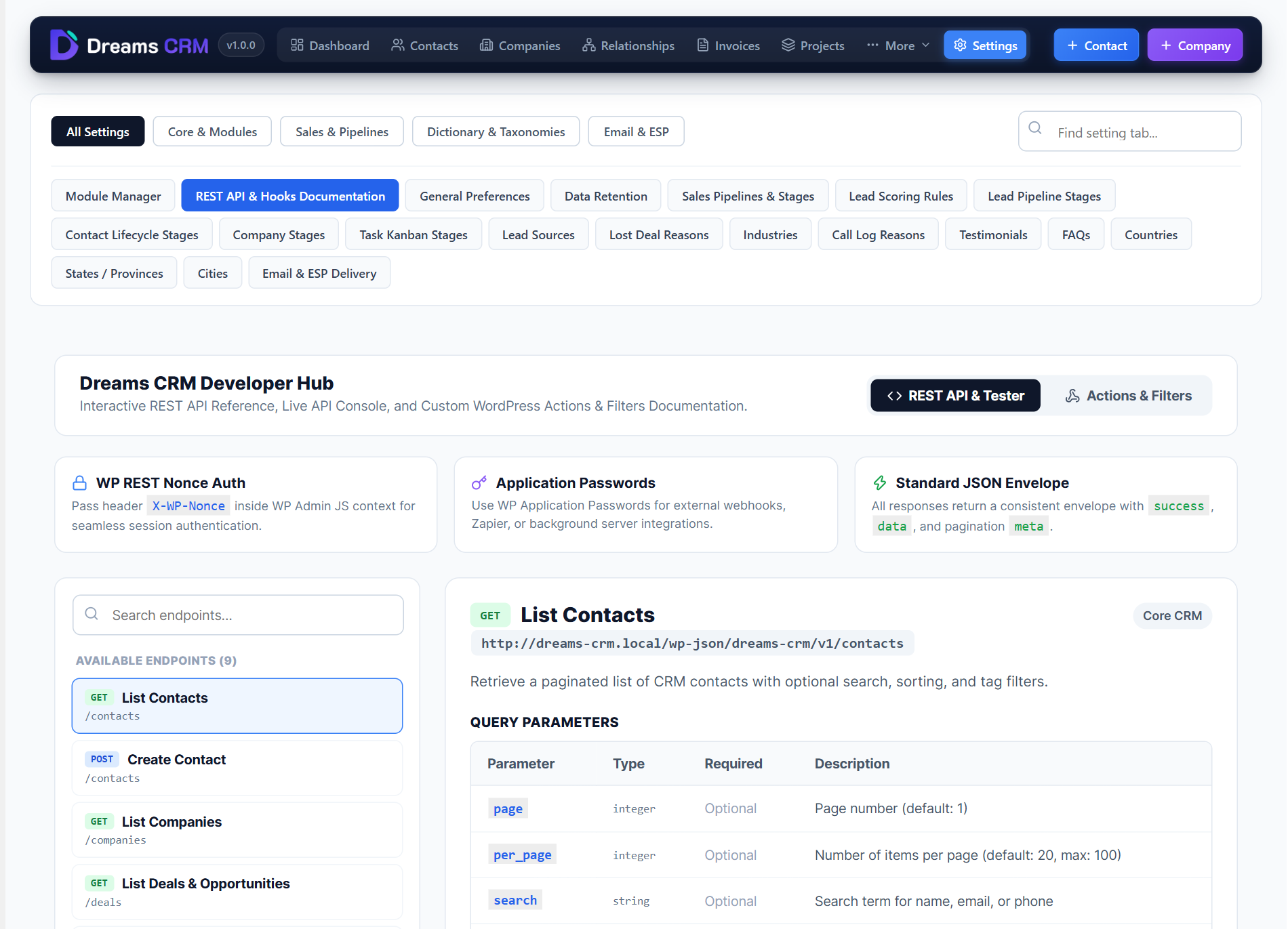
Figure 3.14.8: In-App Interactive REST API Specification & Console.
Developer Hub Highlights
- Interactive Endpoint Directory: Explore all available REST endpoints across Contacts, Companies, Deals, Invoices, Campaigns, and Webhooks with parameter descriptions and return schemas.
- Multi-Method Authentication Guide: Clear
documentation for
X-WP-Noncecookie authentication for frontend JS apps andApplication Passwordsfor external microservices, Zapier, and mobile integrations. - WordPress Actions & Filters Reference:
Complete listing of native WordPress hooks (e.g.
dreams_crm_contact_created,dreams_crm_deal_stage_changed) enabling deep theme and plugin customization.
Section 4: WooCommerce Integration Suite
Detailed technical manual for WooCommerce sales analytics, cart drawers, checkout field customization, and product comparison tools.
Integrates directly with WooCommerce storefront order tables. Synchronizes
completed orders into wp_dcrm_woo_orders to calculate Customer
Lifetime Value (LTV), Average Order Value (AOV), and customer retention cohort
analytics.
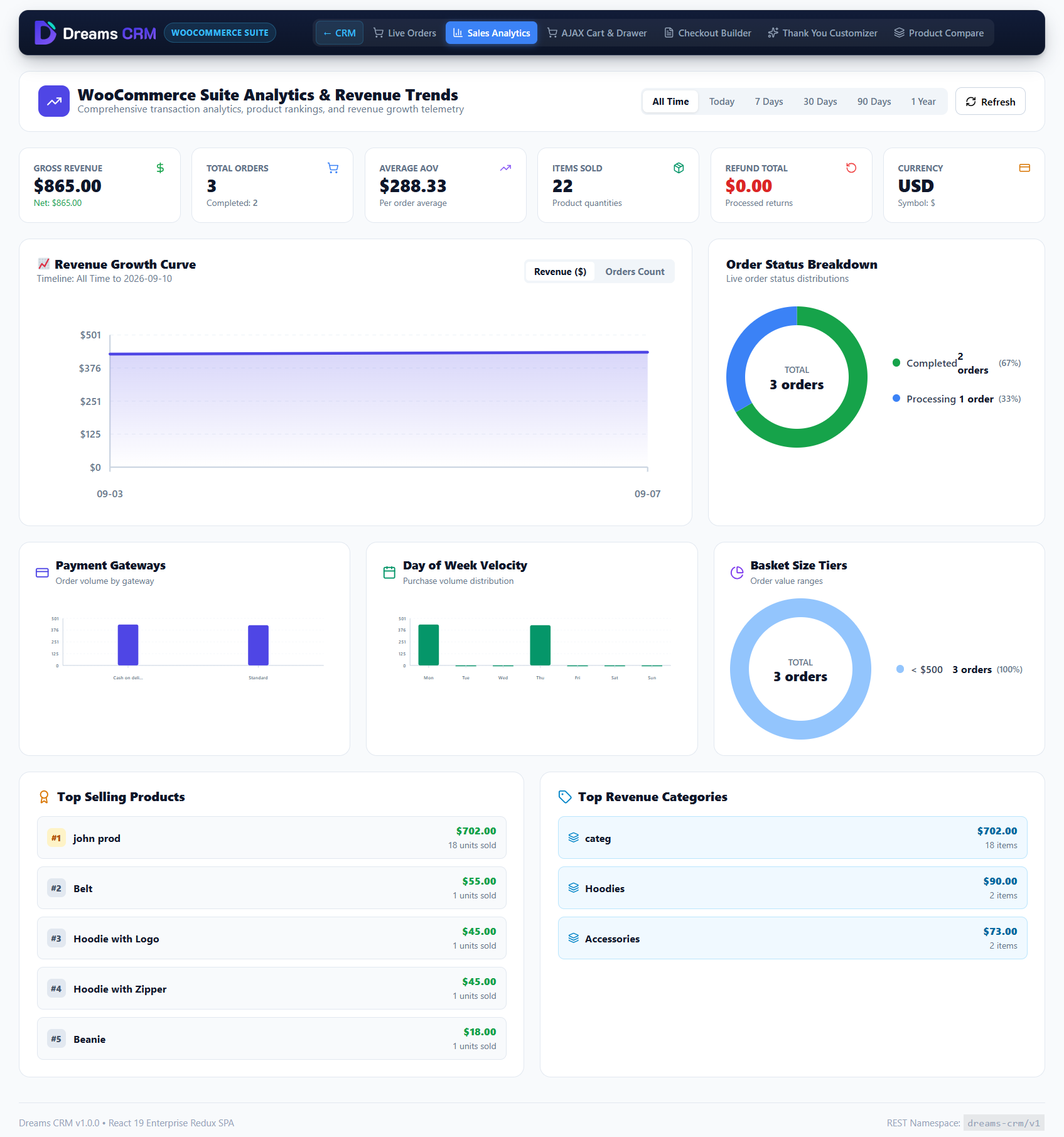
Figure 4.1: Dreams CRM WooCommerce Sales Analytics Dashboard.
Step-by-Step User Guide: Analyzing Storefront Sales
- Automated Order Synchronization: Completed
WooCommerce orders automatically sync into
wp_dcrm_woo_ordersviawoocommerce_order_status_completedhooks with zero manual intervention. - Evaluating Customer Lifetime Value (LTV): Filter metrics by date range to evaluate revenue generated per customer contact. High-LTV customers automatically receive VIP score boosts.
- Monitoring Average Order Value (AOV): Analyze fluctuations in basket size across marketing campaigns and seasonal promotion periods to optimize pricing strategies.
- Cohort Repeat Purchase Rates: Track the percentage of buyers who make a 2nd or 3rd purchase within 30, 60, and 90 days, identifying dormant buyers for automated retention email sequences.
Core E-Commerce Metrics & Formulas
Customer Lifetime Value (LTV)
Total revenue generated by a single customer contact across all historical WooCommerce orders.
Average Order Value (AOV)
Formula:
Total Gross Revenue / Total Order Count over selected
timeframe.
Repeat Customer Rate
Percentage of customer contacts with more than 1 completed purchase.
The AJAX Quick Cart Drawer replaces traditional page-refresh WooCommerce cart
redirects with a frictionless side drawer that slides out smoothly upon adding
any product to cart. Built with vanilla JavaScript and custom REST API endpoints
(/wp-json/dreams-crm/v1/cart/), it maintains real-time state
synchronization with WooCommerce cart sessions without requiring full-page
reloads.
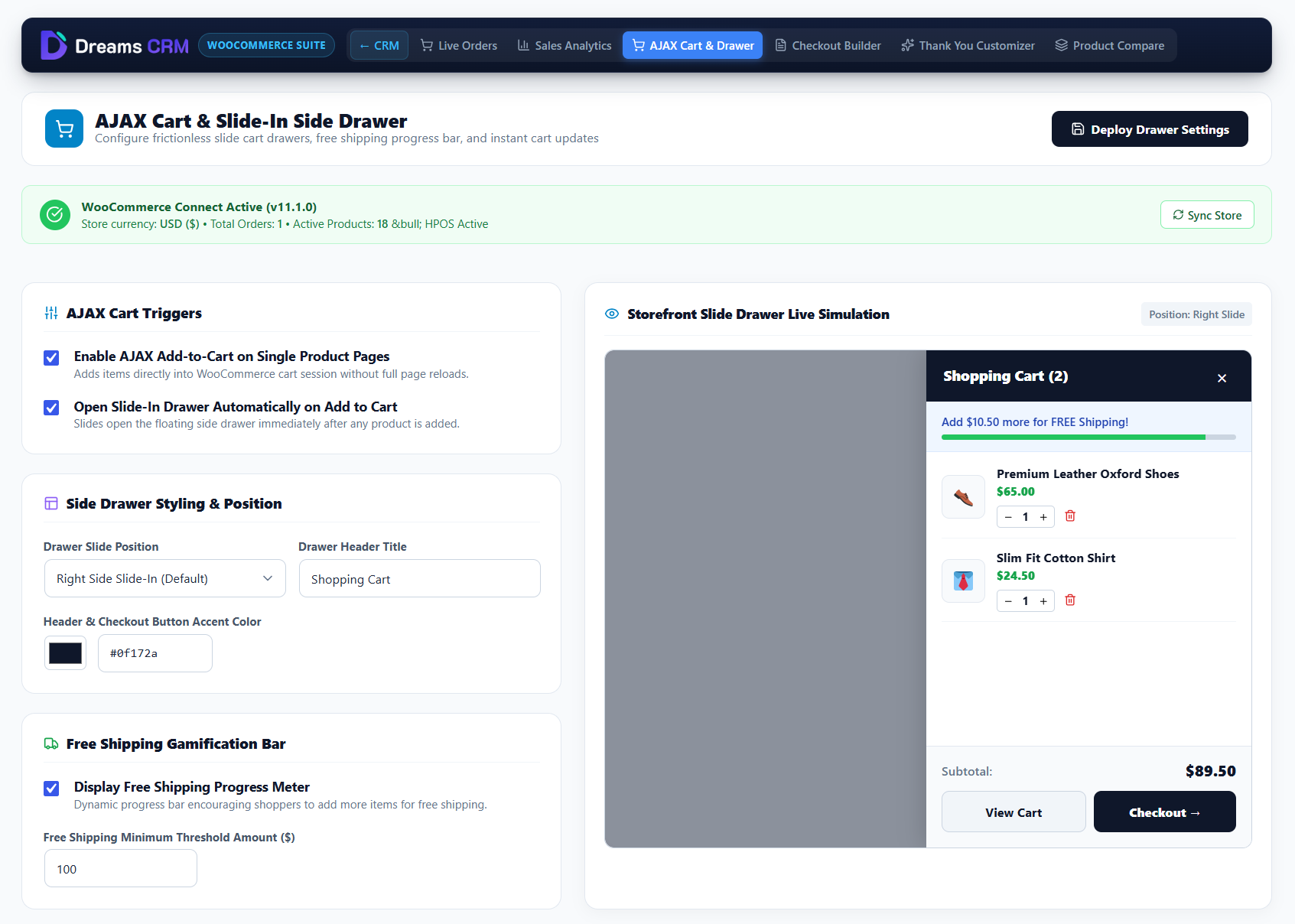
Figure 4.2: Dreams CRM AJAX Quick Cart Drawer Interface.
Step-by-Step User Guide: Configuring the Quick Cart Drawer
- Enabling the Cart Drawer: Navigate to Dreams CRM → WooCommerce → Quick Cart and toggle Enable AJAX Cart Drawer to Active.
- Setting Free Shipping Goal: Enter your
minimum free shipping threshold amount (e.g.
$100.00). The animated progress bar inside the drawer will automatically compute the remaining amount required as shoppers add items. - Configuring Recommended Cross-Sells: Toggle Show Cross-Sell Carousel and select the maximum number of items (1 to 6) to display. Complementary products appear at the bottom of the drawer with 1-click Add to Cart buttons.
- Customizing Drawer Appearance: Choose the slide-in entrance direction (Slide from Right or Slide from Left) and select your theme accent color for the checkout button.
- Abandoned Cart Capture: When a shopper
enters their email in the drawer or checkout form, the session is
tracked in
wp_dcrm_cartsto trigger automated recovery workflows if checkout is abandoned.
Key Technical Capabilities & Features:
- Free Shipping Threshold Bar: Dynamic progress indicator calculated against active WooCommerce shipping zone rules (e.g. "Add $15.00 more to qualify for FREE Express Shipping!").
- 1-Click Coupon Application: AJAX discount input field allowing instant coupon code validation and subtotal recalculation inside the cart drawer.
- Cross-Sell Carousel: Embedded horizontal product slider recommending complementary products based on current cart items with 1-click add-to-cart capability.
- Quantity Adjuster & Real-Time Fragment
Sync: Instant quantity increment counters (+ / -) operating via
wc_fragment_refreshhooks without full page refreshes. - Cart Retention Recovery Trigger: Automatically
captures guest email inputs and queues pending cart sessions to
wp_dcrm_abandoned_cartstable for automated recovery email workflows.
Module Configuration Matrix
| Parameter | Setting Range | Technical Function |
|---|---|---|
Drawer Position |
Left / Right Slide | Controls entrance animation direction for slide-out cart overlay. |
Free Shipping Goal |
Numerical (e.g. 100.00) | Sets target threshold value for real-time progress bar calculation. |
Cross-Sell Max Items |
1 – 6 Products | Defines maximum recommended product items rendered inside cart slider. |
Trigger Auto-Open |
Enable / Disable | Automatically slides drawer open upon clicking any storefront Add to Cart button. |
The Checkout Field Builder empowers store administrators to completely customize, reorder, add, or disable WooCommerce checkout fields through a visual drag-and-drop management panel inside WP Admin. It supports both classic WooCommerce checkout forms and modern Gutenberg WooCommerce Checkout Blocks.
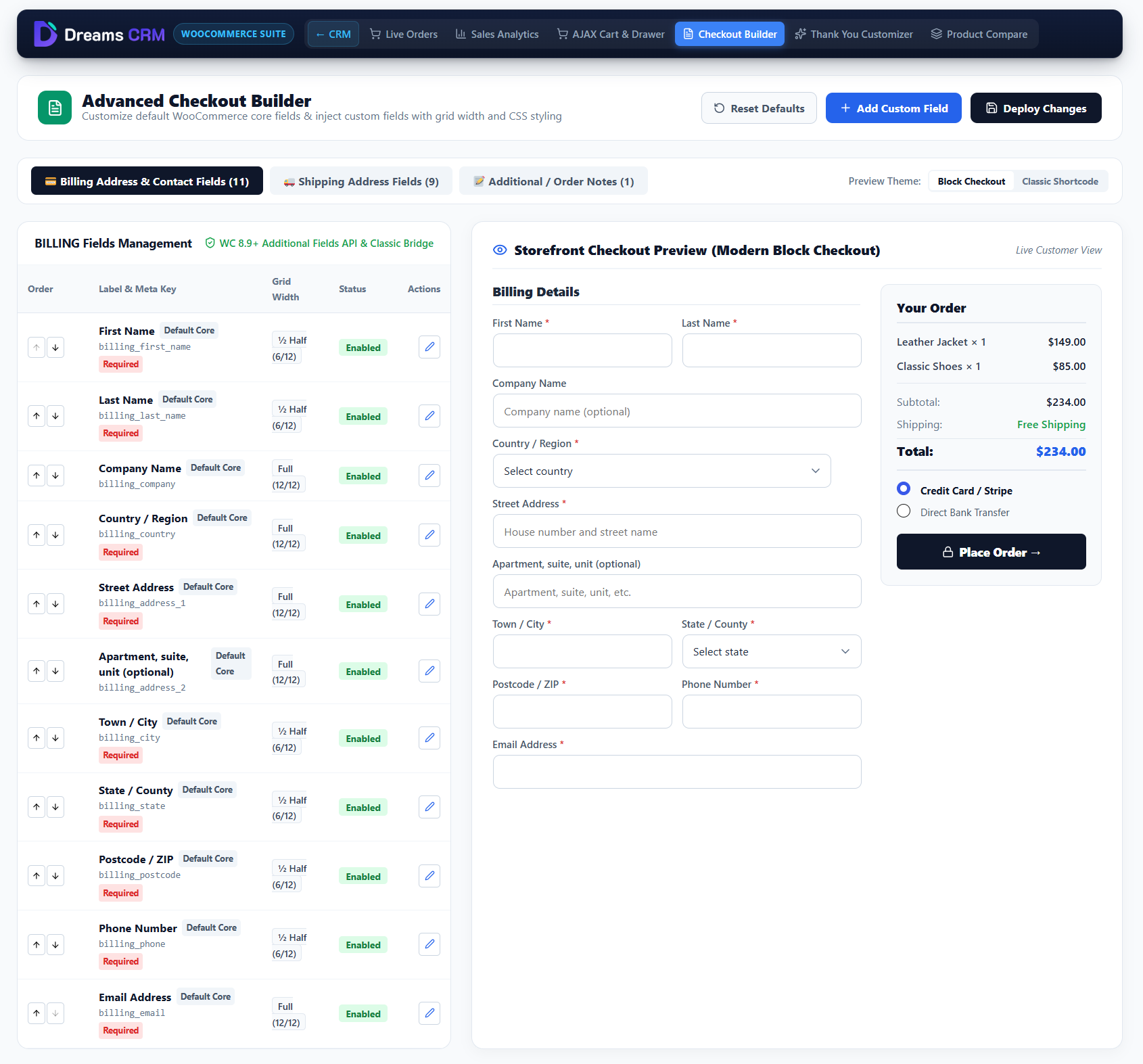
Figure 4.3: Dreams CRM Checkout Field Builder Configuration Panel.
Step-by-Step User Guide: Customizing Checkout Fields
- Visual Drag-and-Drop Reordering: Navigate to Dreams CRM → WooCommerce → Checkout Builder. Drag any field card vertically to adjust the display order on your storefront checkout page.
- Adding Custom Fields: Click + Add Custom Field. Enter the Field Label (e.g. VAT / Tax ID, Preferred Delivery Date), Field Key, Field Type (Text, Dropdown, Date Picker, Checkbox), and assign to Billing or Shipping section.
- Setting Conditional Visibility Rules: Configure logic triggers so fields only appear under specific criteria (e.g. display Company Tax ID only if the Company Name field is populated, or show Delivery Date only for specific shipping methods).
- Validation & Regex Masks: Enforce mandatory input rules and regex formats (e.g. valid European VAT syntax or standardized telephone number formatting).
- Mapping to CRM Contact Attributes: Map
custom checkout inputs directly to contact fields in
wp_dcrm_contact_metaso buyer submissions seamlessly populate customer profiles upon order placement.
Key Technical Capabilities & Features:
- Visual Drag-and-Drop Ordering Grid: Intuitively rearrange standard WooCommerce billing and shipping fields (First Name, Last Name, Company, Address, Phone, Email, Order Notes).
- Custom Field Injection & CRM Mapping:
Create custom checkout input fields (VAT / Tax ID, Business
Registration, Preferred Delivery Date, Delivery Notes) and map
field inputs directly to custom contact attributes in
wp_dcrm_contact_meta. - Conditional Visibility & Logic Rules: Define display rules based on cart subtotal, shipping destination country, customer user role, or specific product categories present in order.
- Field Validation & Regex Masking: Enforce required field rules, regex pattern matching (e.g. valid VAT formats, phone formatting), and custom field placeholder tooltips.
- Filter Hook Compatibility: Hooks directly into
WooCommerce checkout filter hooks (
woocommerce_checkout_fields,woocommerce_billing_fields,woocommerce_shipping_fields) preserving full compatibility with gateway plugins.
Supported Input Field Types
Text & Textarea
Single-line text, email inputs, and multi-line notes boxes.
Select & Radio
Single choice select dropdowns and radio option groups.
Date & Time Picker
Flatpickr date picker with min/max date boundaries.
The Dynamic Thank You Page Rules module replaces the generic WooCommerce order confirmation screen with intelligent, context-driven thank-you experiences. Merchants can configure granular conditional redirection rules, personalized post-purchase promotional banners, survey feedback forms, and exclusive cross-sell vouchers tailored to what the customer actually bought.
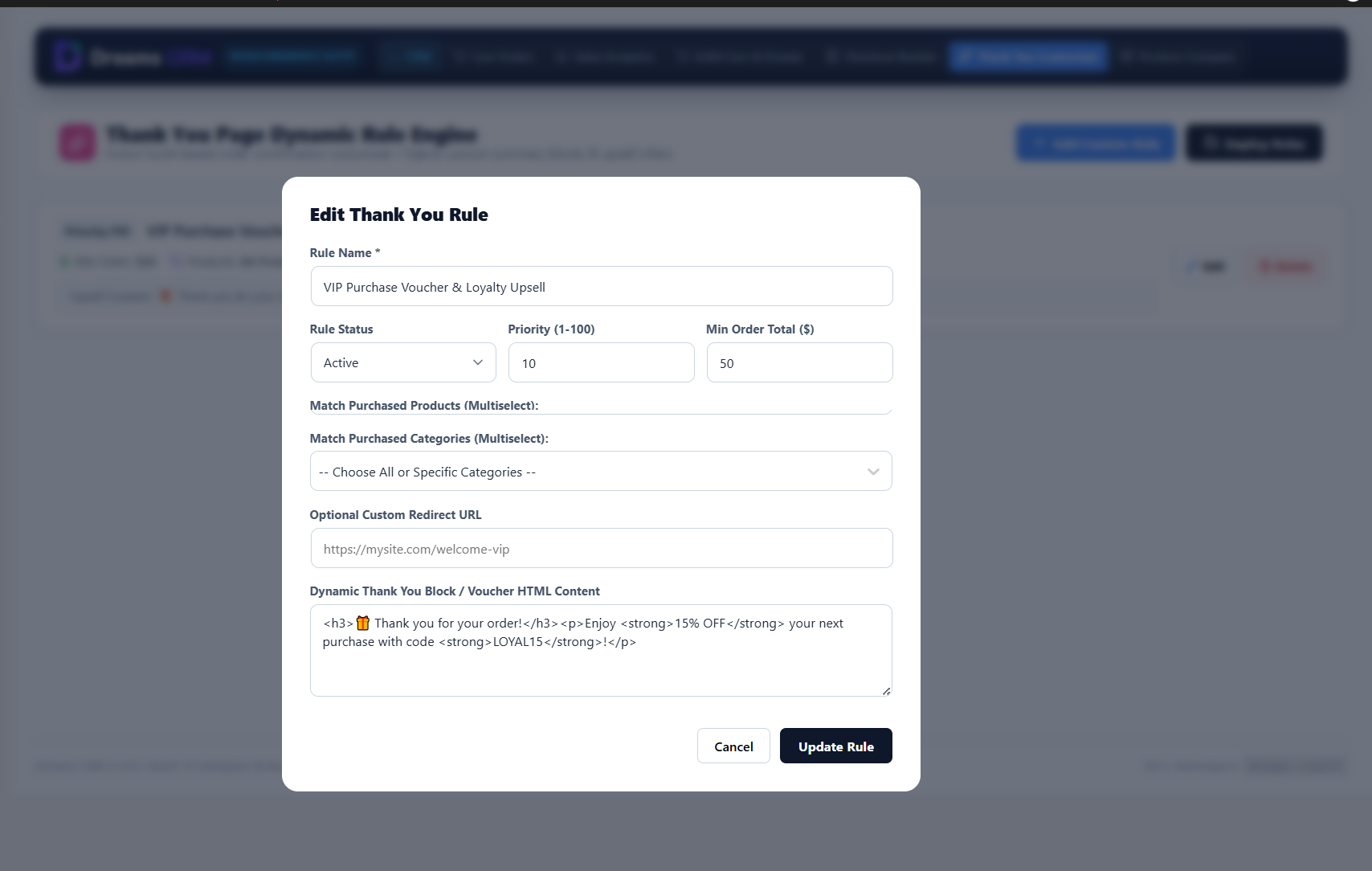
Figure 4.4: Dreams CRM Dynamic Thank You Page Rules & Customizer Interface.
Step-by-Step User Guide: Configuring Dynamic Thank You Rules
- Creating a Thank You Rule: Under Dreams CRM → WooCommerce → Thank You Rules, click + Add New Rule. Enter a descriptive title (e.g. High-Value Orders VIP Banner).
- Configuring Trigger Conditions: Set conditions based on: Gross Order Subtotal (e.g. > $200), Payment Method (e.g. Direct Bank Transfer), or Specific Product Categories.
- Customizing Confirmation Content: Choose whether to inject a personalized greeting banner, embed a video walkthrough, display a post-purchase feedback survey, or generate a dynamic 15% re-order coupon code valid for 48 hours.
- Ordering Rule Priorities: Drag rules in the priority table. The engine evaluates order parameters from top to bottom; the first matching rule dictates the confirmation layout.
Key Capabilities & Conditional Triggers:
- Multi-Condition Rule Engine: Evaluate orders against parameters including payment gateway used (e.g. Stripe, PayPal, COD), total order value ranges, user membership role, shipping method, and product taxonomy/category matches.
- Custom Content Injection & Visual Blocks: Display personalized post-purchase video embeds, order-specific delivery instructions, customer survey widgets, or dynamic social sharing links.
- Dynamic Discount & Re-Order Coupon: Generate unique, time-limited discount coupon codes on the confirmation screen to incentivize repeat purchases within 24–48 hours.
- External Redirection or In-Page Replacement: Option to seamlessly replace native WooCommerce order-received templates or redirect high-value VIP customers to specialized dedicated landing pages.
- Order Meta Synchronization: Automatically logs
rule triggers and customer survey feedback into
wp_dcrm_activitiesand attaches details to the customer contact timeline.
Rule Trigger Evaluation Priority
| Priority Order | Trigger Condition Type | Evaluation Logic |
|---|---|---|
| Level 1 | Specific Product / Category |
Highest precedence; matches if order contains configured target SKU or category IDs. |
| Level 2 | Order Value Range (Min/Max) |
Evaluates gross order subtotal against thresholds (e.g. VIP orders > $500). |
| Level 3 | Payment Method Gateway |
Matches checkout payment IDs (e.g. custom bank transfer instructions vs credit card). |
| Level 4 | Default Fallback Template |
Standard enhanced thank-you layout rendered when no specific rule criteria match. |
The Product Compare Matrix provides buyers with a floating side-by-side comparison drawer, enabling them to select multiple WooCommerce items across catalog pages and compare technical specifications, prices, attributes, stock availability, and customer ratings in a clean tabular grid.
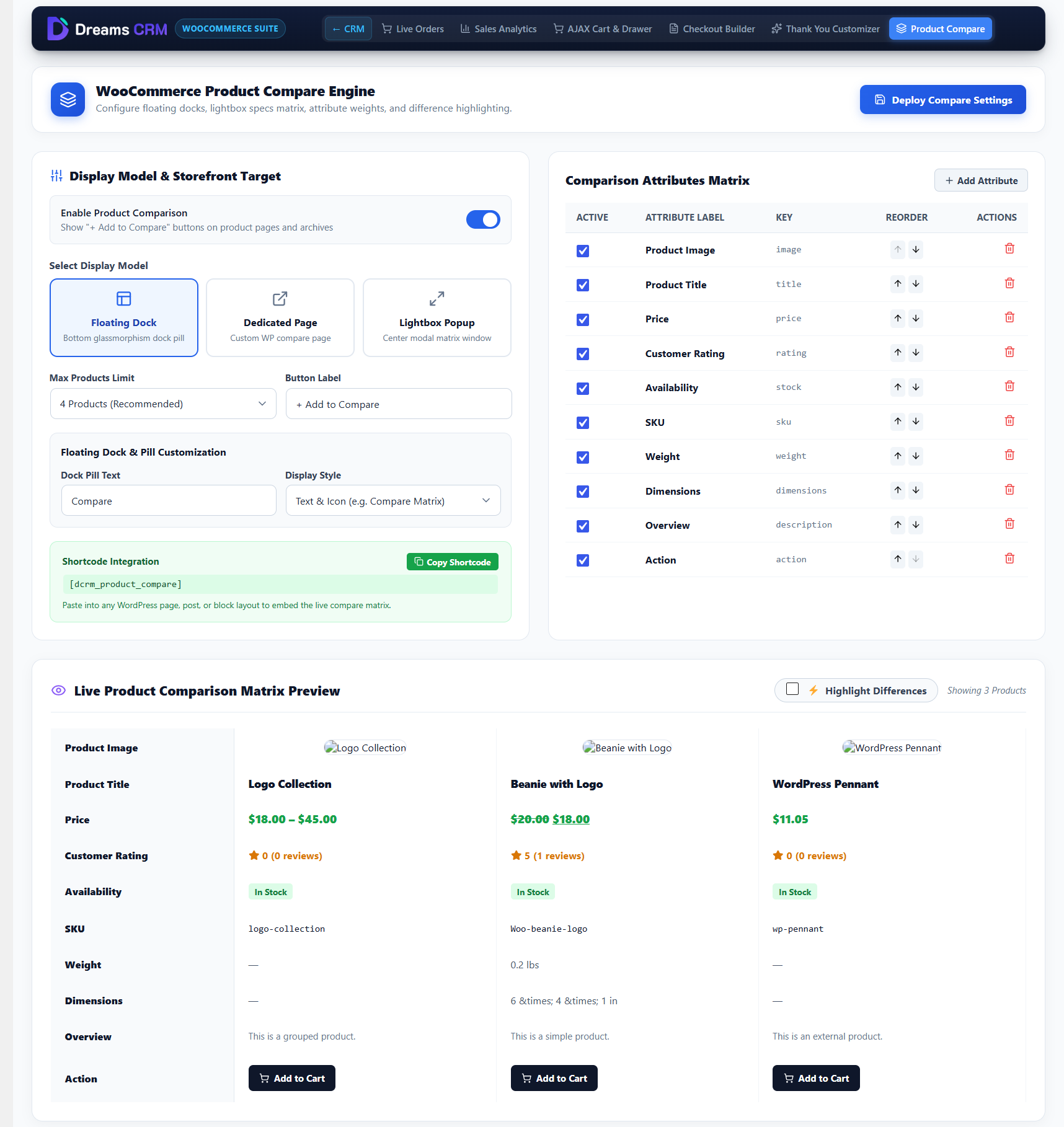
Figure 4.5: Dreams CRM Product Compare Matrix Panel.
Step-by-Step User Guide: Enabling & Managing Product Comparisons
- Enabling the Compare Module: Under Dreams CRM → WooCommerce → Product Compare, toggle Enable Comparison Dock to On.
- Selecting Global Attributes to Compare:
Check the global WooCommerce attributes to include in comparison rows
(e.g.
pa_brand,pa_size,pa_color,pa_ram, Weight, Dimensions, In-Stock Status, Customer Rating). - Storefront Customer Experience: When shoppers browse catalog or single product pages, clicking the Compare button docks items into a persistent bottom floating dock bar.
- Side-by-Side Comparison Drawer: Clicking Compare Now opens a clean modal comparison table. Shoppers can toggle the Highlight Differences switch to spotlight contrasting technical specs, and click Add to Cart directly from the table headers.
Key Technical Capabilities & Features:
- Sticky Storefront Floating Dock: Persistent bottom dock bar showing current selected items for comparison, accessible from archive grids, shop pages, and single product views.
- Attribute Difference Highlight: Interactive toggle ("Highlight Differences") that isolates conflicting specs (e.g., CPU, RAM, Dimensions, Warranty) to assist buyers in evaluating competing product variations.
- LocalStorage & Session Persistence: Stores
comparison lists in browser
localStorageand customer session cookies so selected comparison items persist seamlessly across page navigations. - 1-Click Purchase from Comparison: Direct Buy buttons inside comparison table headers enabling immediate purchase of evaluated items.
- Custom Attribute Schema Mapping: Configurable
attribute selection allowing store managers to specify global attributes
(e.g.
pa_brand,pa_color,pa_size,pa_material) rendered in comparison grids.
Technical Performance Specifications
| Capability | Specification / Limit | Implementation Details |
|---|---|---|
Max Compare Items |
Up to 4 Products Simultaneously | Optimized horizontal layout grid for side-by-side matrix view. |
Viewport Adaptation |
Full Responsive Scroll | Horizontal touch-drag scrolling for tablet and mobile viewports. |
Specs REST Endpoint |
GET /wp-json/dreams-crm/v1/compare/specs |
Asynchronous REST API query returning cached attribute matrix JSON. |
Dreams CRM features a decoupled, headless architecture powered by a
high-throughput REST API under namespace dreams-crm/v1. Every
action available in the React Single-Page Application is accessible to external
developers, ERP systems, Zapier automations, and mobile clients.
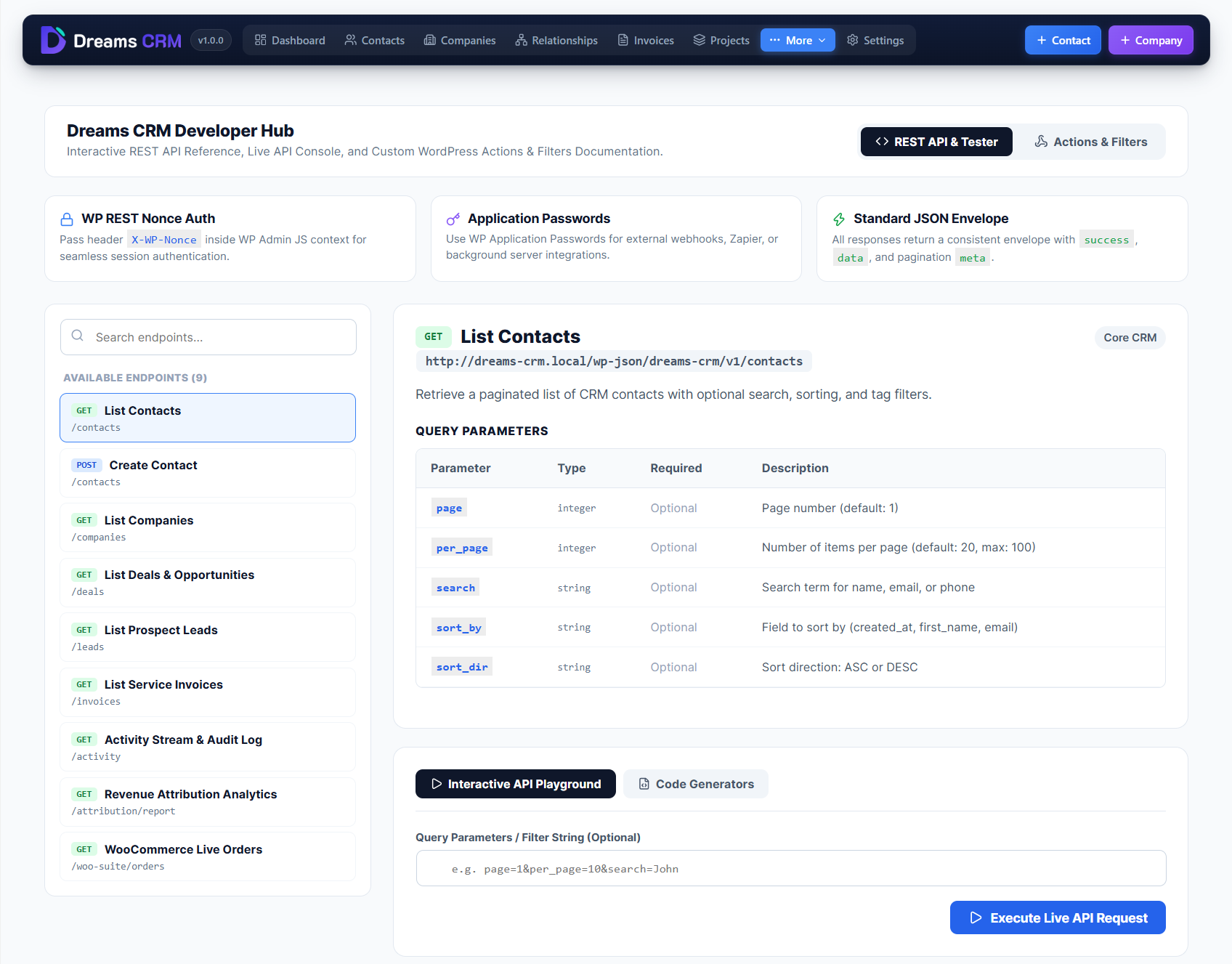
Figure 5.1: Dreams CRM Interactive REST API Specification & Endpoint Explorer.
Authentication Mechanisms
Cookie Nonce Authentication
For internal WordPress admin requests
and the React SPA. Requires header:
X-WP-Nonce: {wp_create_nonce('wp_rest')}.
Application Passwords & Bearer Tokens
For external integrations (Zapier,
mobile apps, third-party microservices). Requires header:
Authorization: Basic {base64(user:app_password)} or
Bearer {jwt_token}.
Comprehensive REST Endpoint Directory
| HTTP | Endpoint Route | Capability Flag | Operation Description |
|---|---|---|---|
| Dashboard & Telemetry | |||
| GET | /dreams-crm/v1/dashboard/kpis |
view_analytics |
Aggregated KPIs: contact growth, pipeline total, conversion rates, and activity stream. |
| GET | /dreams-crm/v1/funnel/analytics |
view_analytics |
Step-by-step conversion funnel drop-off analytics. |
| GET | /dreams-crm/v1/attribution |
view_analytics |
Multi-touch marketing revenue attribution touchpoints. |
| Contacts Directory | |||
| GET | /dreams-crm/v1/contacts |
view_contacts |
List paginated contacts with debounced search, stage filters, and sorting. |
| POST | /dreams-crm/v1/contacts |
create_contacts |
Create new contact record with associated custom fields. |
| GET | /dreams-crm/v1/contacts/{id} |
view_contacts |
Fetch single contact profile with linked deals, company, notes, and activity timeline. |
| PUT | /dreams-crm/v1/contacts/{id} |
edit_contacts |
Update contact attributes, lifecycle stage, or custom field values. |
| DELETE | /dreams-crm/v1/contacts/{id} |
delete_contacts |
Permanently remove or soft-delete contact record. |
| POST | /dreams-crm/v1/contacts/{id}/calls |
edit_contacts |
Log phone call duration, date, and outcome notes to contact timeline. |
| Companies Directory | |||
| GET | /dreams-crm/v1/companies |
view_companies |
List organization accounts with employee counts and total deal valuation. |
| POST | /dreams-crm/v1/companies |
create_companies |
Create organization account with domain, industry, and address details. |
| PUT | /dreams-crm/v1/companies/{id} |
edit_companies |
Update organization firmographics or parent company linkage. |
| Pipelines & Deals | |||
| GET | /dreams-crm/v1/deals |
view_deals |
Fetch deals grouped by pipeline and stages for Kanban rendering. |
| POST | /dreams-crm/v1/deals |
create_deals |
Create new deal opportunity with monetary amount, probability, and close date. |
| POST | /dreams-crm/v1/deals/{id}/move |
move_deals |
Transition deal card to new stage ID with optimistic update rollback support. |
| GET | /dreams-crm/v1/pipelines |
view_deals |
List configured pipelines and their defined stages with win probabilities. |
| Invoicing & Billing | |||
| GET | /dreams-crm/v1/invoices |
view_invoices |
List invoices with payment status, balances due, and recipient details. |
| POST | /dreams-crm/v1/invoices |
create_invoices |
Generate itemized invoice with multi-line items, taxes, discounts, and currency. |
| POST | /dreams-crm/v1/invoices/{id}/record-payment |
edit_invoices |
Record partial or full payment against invoice and transition status to Paid. |
| Roles & Security | |||
| GET | /dreams-crm/v1/roles |
manage_rbac |
Fetch 52-capability matrix for all registered WordPress and custom CRM roles. |
| PUT | /dreams-crm/v1/roles/{role} |
manage_rbac |
Update granular permission checkboxes stored in
wp_dcrm_roles_meta.
|
| Scoring & Deduplication | |||
| POST | /dreams-crm/v1/dedup/scan |
manage_settings |
Trigger asynchronous background deduplication scan across contacts. |
| POST | /dreams-crm/v1/dedup/merge |
edit_contacts |
Merge candidate duplicate into primary master record with consolidated timeline. |
| WooCommerce Suite | |||
| GET | /dreams-crm/v1/woo/analytics |
view_analytics |
Fetch WooCommerce sales totals, Customer Lifetime Value (LTV), and Average Order Value (AOV). |
| GET | /dreams-crm/v1/cart |
None (Public) | Fetch real-time cart fragments, subtotal, and free shipping progress for quick drawer. |
| GET | /dreams-crm/v1/compare/specs |
None (Public) | Return comparative technical specification JSON for requested product IDs. |
Sample Request: Create Contact Record
POST /wp-json/dreams-crm/v1/contacts HTTP/1.1
Host: yoursite.com
Content-Type: application/json
X-WP-Nonce: a1b2c3d4e5

{
  "first_name": "Alexander",
  "last_name": "Hamilton",
  "email": "alexander@treasury.gov",
  "phone": "+1-212-555-0177",
  "company_id": 14,
  "lifecycle_stage": "lead",
  "score": 45,
  "custom_fields": {
    "vat_number": "US-987654321",
    "budget": "$100,000"
  }
}Unlike traditional WordPress CRM plugins that store records as Custom Post Types
(CPTs) in wp_posts and wp_postmeta—causing severe
database bloat and query timeouts beyond 10,000 rows—Dreams CRM operates on an
isolated, dedicated database schema comprising 52 custom SQL
tables with foreign key indexing.
52 Dedicated SQL Tables Breakdown
Core Entities & Billing (12 Tables)
wp_dcrm_contacts— Primary contact profileswp_dcrm_contact_meta— Contact EAV attributeswp_dcrm_companies— Organization B2B accountswp_dcrm_leads— Inbound lead acquisition recordswp_dcrm_deals— Pipeline deal opportunitieswp_dcrm_pipelines— Multi-pipeline registrieswp_dcrm_stages— Pipeline stage definitionswp_dcrm_invoices— Invoice header recordswp_dcrm_inv_items— Itemized invoice line itemswp_dcrm_projects— Client project milestoneswp_dcrm_tasks— Scheduled team taskswp_dcrm_relationships— Bidirectional node graph links
Marketing, Funnels & Scoring (16 Tables)
wp_dcrm_campaigns— Broadcast email campaignswp_dcrm_templates— Reusable HTML email templateswp_dcrm_queue— Throttled outgoing mail queuewp_dcrm_events— Email opens, clicks, and bounceswp_dcrm_ab_tests— A/B split experiment headerswp_dcrm_ab_vars— A/B test variant configurationswp_dcrm_ab_logs— Impression & conversion telemetrywp_dcrm_funnels— Sales conversion funnelswp_dcrm_f_steps— Funnel progression stepswp_dcrm_f_analytics— Funnel conversion metricswp_dcrm_score_rules— Predictive scoring criteriawp_dcrm_contact_scores— Computed contact score cachewp_dcrm_score_history— Score fluctuation audit logwp_dcrm_dedup_candidates— Duplicate candidate pairswp_dcrm_merge_log— Contact merge audit recordswp_dcrm_revenue_attr— Revenue attribution models
Commerce & Integrations (8 Tables)
wp_dcrm_woo_orders— Synced WooCommerce order cachewp_dcrm_carts— Abandoned storefront cart sessionswp_dcrm_checkout_fields— Custom checkout field definitionswp_dcrm_thankyou_rules— Conditional thank-you page ruleswp_dcrm_cf7_feeds— Contact Form 7 field mappingswp_dcrm_custom_fields— Dynamic entity custom field schemawp_dcrm_custom_field_values— Custom field value storagewp_dcrm_roles_meta— 52-capability RBAC matrix
Lookups, Logs & Registries (16 Tables)
wp_dcrm_activities— Global CRM interaction streamwp_dcrm_activity_log— System security event logwp_dcrm_c_notes/wp_dcrm_c_calls— Contact notes & callswp_dcrm_comp_notes/wp_dcrm_comp_calls— Company notes & callswp_dcrm_sources— Lead acquisition source dropdownswp_dcrm_industries— Organization industry sectorswp_dcrm_lost_reasons— Closed deal loss categorizationwp_dcrm_call_reasons— Phone call purpose taxonomieswp_dcrm_countries/states/cities— Geographic lookupswp_dcrm_dash_prefs— User dashboard widget arrangements
Dreams CRM exposes standard WordPress action and filter hooks, allowing theme developers and agency partners to programmatically extend every workflow.
Core Action Hooks
| Action Hook | Parameters | Trigger Timing |
|---|---|---|
dreams_crm/contact_created |
(int $contact_id, array $data) |
Fires immediately after a new contact profile is inserted into
wp_dcrm_contacts.
|
dreams_crm/deal_stage_changed |
(int $deal_id, int $old_stage, int $new_stage) |
Fires when a sales deal is moved across pipeline Kanban stages. |
dreams_crm/invoice_paid |
(int $invoice_id, float $amount, string $gateway)
|
Fires when an invoice payment is recorded or synced from WooCommerce. |
dreams_crm/cf7_lead_ingested |
(int $contact_id, int $form_id, array $posted_data)
|
Fires when a Contact Form 7 submission successfully creates or updates a lead. |
Developer Code Examples
// Example 1: Send Slack webhook notification when a deal is Won
add_action( 'dreams_crm/deal_stage_changed', function( $deal_id, $old_stage, $new_stage ) {
    // Stage ID 5 represents 'Closed Won' in this pipeline
    if ( 5 === (int) $new_stage ) {
        wp_remote_post( 'https://hooks.slack.com/services/YOUR/SLACK/WEBHOOK', [
            'headers' => [ 'Content-Type' => 'application/json' ],
            'body'    => json_encode( [
                'text' => sprintf( '🎉 Deal #%d was officially marked WON! Congratulations team!', $deal_id ),
            ] ),
        ] );
    }
}, 10, 3 );

// Example 2: Add custom merge tag for email campaign templates
add_filter( 'dreams_crm_email_merge_tags', function( $tags, $contact_id ) {
    $loyalty_tier = get_user_meta( $contact_id, 'loyalty_tier', true ) ?: 'Bronze';
    $tags['{{loyalty_tier}}'] = $loyalty_tier;
    return $tags;
}, 10, 2 );Dreams CRM includes native WP-CLI command integration for automated staging deployment, headless server provisioning, demo data generation, and cron maintenance.
| WP-CLI Command | Accepted Options | Function Description |
|---|---|---|
wp dreams-crm seed |
--count=[10|20|50|100] |
Populates all CRM modules with realistic relational demo records (Contacts, Companies, Deals, Invoices, Tasks). |
wp dreams-crm truncate |
--force |
Empties all CRM records and activity streams while safely preserving database schema definitions and settings. |
wp dreams-crm dedup run |
--batch=[50|100] |
Executes an immediate command-line batch deduplication scan over contact profiles without browser overhead. |
wp dreams-crm status |
--format=json |
Outputs system health status, active table row counts, Action Scheduler queue sizes, and version info. |
CLI Terminal Example:
# Seed 50 demo records across all CRM modules
$ wp dreams-crm seed --count=50
Success: Seeded 50 contacts, 50 companies, 50 leads, 50 deals, and 50 invoices successfully.

# Check CRM system health status
$ wp dreams-crm status
+-------------------+------------+
| Component         | Status     |
+-------------------+------------+
| Custom Tables     | 52 / 52 OK |
| Total Contacts    | 1,240      |
| Total Deals       | 315        |
| Active Pipelines  | 3          |
| Action Scheduler  | 0 Pending  |
+-------------------+------------+Q: REST API returns 404 Not Found on all endpoints?
Resolution: WordPress rewrite rules require flushing. Navigate to WP Admin → Settings → Permalinks and simply click Save Changes. Ensure your permalink structure is set to Post name rather than Plain.
Q: Database tables not created upon plugin activation?
Resolution: Verify your
MySQL database user possesses CREATE TABLE and
ALTER TABLE privileges. You can manually re-trigger
migration creation at any time under Dreams CRM → Settings →
Maintenance → Re-run Migrations.
Q: "Nonce Verification Failed" or 403 Forbidden errors in admin SPA?
Resolution: WordPress security nonces expire every 12–24 hours. Refresh your browser window to regenerate a fresh nonce token, or clear your browser cache if aggressive object caching (Redis/Memcached) is serving stale admin HTML pages.
Q: Large CSV import runs into PHP memory exhaustion or timeout?
Resolution: Increase your
server PHP memory limit in wp-config.php via
define('WP_MEMORY_LIMIT', '256M'); and set
max_execution_time = 300 in your php.ini. For
files exceeding 20,000 rows, use the native WP-CLI import command.
Q: Outgoing campaign emails landing in spam or not sending?
Resolution: Shared web
host wp_mail() often lacks SPF, DKIM, and DMARC DNS
records. Configure an authenticated SMTP service (e.g. SendGrid,
Mailgun, Amazon SES) under Dreams CRM → Settings → Email
Delivery to guarantee 99%+ deliverability.
Need Support?
If this documentation does not address your questions, please feel free to contact us via email at support@dreamstechnologies.com
Reach the team at GMT+5:30. Typical reply within 12–24 hours on weekdays — rarely up to 48 hrs during holidays. Support is available to verified buyers for template-related issues.
Contact SupportImportant Note : We strive to offer top-notch support, but it's only available to verified buyers and for template-related issues such as bugs and errors. Custom changes and third-party module setups are not covered.
Do you need a customized application for your business?
If you need a customized application for your business depends on your specific requirements and goals, Please contact us. Customization can be the key to success, ensuring your project perfectly aligns with your unique goals and requirements.
Don't Miss Out on the Benefits of Customization!
Unlock the potential of your project. It's time to ensure your project isn't another cookie-cutter solution but truly unique and effective one.
Discover how customization can make a difference in your project's success. Let's create a solution that's as unique as your vision!
We'll tailor the application to meet your specific needs and preferences.
We will upload your website to the server and ensure it is live.

Thank You
Thank you once again for downloading Dreams CRM.
We hope you're enjoying your experience, and we kindly request that you take a
moment to share your valuable review and rating with us.